<?xml version="1.0" encoding="utf-8"?>
<feed xmlns="http://www.w3.org/2005/Atom">
	<title>VSzA techblog</title>
	<link rel="alternate" type="text/html" href="https://techblog.vsza.hu/"/>
	<link rel="self" type="application/atom+xml" href="https://techblog.vsza.hu/atom.xml"/>
	<updated>2012-10-23T20:46:56+02:00</updated>
   <generator uri="http://github.com/stef/utterson">utterson v0.4</generator>
   <id>https://techblog.vsza.hu/</id>
	<entry>
		<title>How I customized LaTeX beamer output</title>
		<link rel="alternate" type="text/html" href="https://techblog.vsza.hu/posts/How_I_customized_LaTeX_beamer_output.html"/>
		<updated>2012-10-23T20:46:56+02:00</updated>
      <id>https://techblog.vsza.hu/posts/How_I_customized_LaTeX_beamer_output.html</id>
      <author><name>dnet</name></author>
		<category term="POSTCATEGORY" scheme="http://www.sixapart.com/ns/types#category"/>
		<content type="html" xml:lang="en" xml:base="https://techblog.vsza.hu"><![CDATA[
      <p>Because of a <a href="https://github.com/reedcourty/bme-mit-ftsrg-latex-template/commit/7b43081">response</a> I got to my <a href="https://techblog.vsza.hu/posts/Using_MS_Word_templates_with_LaTeX_quickly.html">post about using MS Word templates with LaTeX</a>,
documenting the way I've been generating presentation material for my talks
since 2010 got its priority raised. Like I said in the aforementioned post, I
prefer using LaTeX for typesetting, and it's the same for creating those frames
that appear behind my back during talks.</p>

<p>For the first few talks, I used the default template, then I switched to the
<code>Warsaw</code> theme, which I frequently encounter in the beamer-using subset of IT
security presenters. In 2011, <a href="http://lasky.hu/">Lasky</a> – the graphics genius around Sil&#x65;nt
Signal – designed a presentation template that I actually liked, so I started
fiddling with beamer to adapt the new theme.</p>

<p>First, I created a file called <code>s2beamer.sty</code> with the usual header, and two
lines that set a sensible base. I had to disable shadow, since it couldn't
handle setting background images, as it assumed that the background was a
solid color.</p>

<pre><code>\ProvidesPackage{s2beamer}

\useinnertheme[shadow=false]{rounded}
\usecolortheme{whale}
</code></pre>

<p>The theme I used included a separate background image for the title
slide, and another for the rest (the ones with actual content), so I defined
a command to create a title slide, which sets the background before and after
the first frame. I added newlines only for readability, they must be removed
or commented in the <code>.sty</code> file.</p>

<pre><code>\newcommand{\titleframe}{
    \usebackgroundtemplate{
        \includegraphics[width=\paperwidth,height=\paperheight]
            {img/titlebg.jpg}
    }
    \frame{\titlepage}
    \usebackgroundtemplate{
        \includegraphics[width=\paperwidth,height=\paperheight]
            {img/slidebg.jpg}
    }
}
</code></pre>

<p>After setting the background, the colors needed to be changed too. First, I set
the color of the body text and structural elements (such as list bullets). The
color of the frame titles was set to the same orangeish one.</p>

<pre><code>\setbeamercolor{normal text}{fg=white}
\usecolortheme[RGB={239,73,35}]{structure}
\setbeamercolor{frametitle}{fg=structure, bg=}
</code></pre>

<p>The default list bullets are actual bullets, which looked bad on the background
image, so I changed them to little arrows. Also, I hid the navigation controls
(placed in the lower-right corner) since they conflicted with the footer of the
theme, and most people doesn't even know what they're for.</p>

<pre><code>\setbeamertemplate{items}[default]
\setbeamertemplate{navigation symbols}{}
</code></pre>

<p>URLs and code snippets are written using fixed-size fonts (as they should be),
but I prefer using <a href="http://levien.com/type/myfonts/inconsolata.html">Inconsolata</a> for this purpose, instead of the default.</p>

<pre><code>\RequirePackage{inconsolata}
</code></pre>

<p>In case of code snippets, I prefer using the <a href="https://en.wikibooks.org/wiki/LaTeX/Packages/Listings">listings</a> package, and I
configured it to use such colors for syntax highlighting that go well with
the theme (newline added in case of the last line for readability only).</p>

<pre><code>\RequirePackage{listings}
\definecolor{s2}{RGB}{240, 56, 31}
\definecolor{s2y}{RGB}{255, 200, 143}
\lstset{basicstyle=\footnotesize\ttfamily, breaklines=true,
    tabsize=2, keywordstyle=\color{s2}, stringstyle=\color{s2y}}
</code></pre>

<p>Since I give talks both in English and Hungarian, I added the following
expression to set the <a href="https://en.wikipedia.org/wiki/Personal_name#Name_order">order of first and last name</a> according to <a href="https://en.wikibooks.org/wiki/LaTeX/Internationalization">babel</a>
language set by the document. (The <code>\hunnexlabel</code> command is defined when
the babel language is set to <code>magyar</code>.) It also turns the e-mail address
into a hyperlink that launches the default e-mail client when clicked on.</p>

<pre><code>\ifdefined\hunnewlabel
    \renewcommand{\name}{\lastname\ \firstname}
\else
    \renewcommand{\name}{\firstname\ \lastname}
\fi

\author{\name\\\texttt{\href{mailto:\email}{\email}}}
</code></pre>

<p>The above lines require the following commands in the document:</p>

<pre><code>\renewcommand{\email}{vsza@sil&#x65;ntsignal.hu}
\renewcommand{\firstname}{András}
\renewcommand{\lastname}{Veres-Szentkirályi}
</code></pre>

<p>With these all set, I can create presentation material that look awesome but
are still generated from plain text, thus compatible with all sensible editors
and SCMs. You can see the snippets above in action by taking a look at my
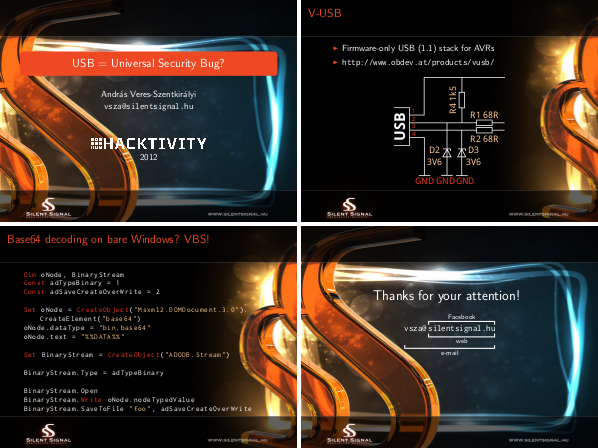
<a href="https://silentsignal.hu/docs/S2_VSzA_Hacktivity2012.pdf">Hacktivity 2012 slides</a> (four of them are below this paragraph), and some
of them in <a href="https://silentsignal.hu/docs/S2_VSzA_Hacktivity2011.pdf">the ones I made for Hacktivity 2011</a>.</p>

<p><img src="https://techblog.vsza.hu/images/s2beamer.png" alt="Four slides from my Hacktivity 2012 talk" title="" /></p>
]]></content>
	</entry>
	<entry>
		<title>Using MS Word templates with LaTeX quickly</title>
		<link rel="alternate" type="text/html" href="https://techblog.vsza.hu/posts/Using_MS_Word_templates_with_LaTeX_quickly.html"/>
		<updated>2012-09-12T21:34:16+02:00</updated>
      <id>https://techblog.vsza.hu/posts/Using_MS_Word_templates_with_LaTeX_quickly.html</id>
      <author><name>dnet</name></author>
		<category term="POSTCATEGORY" scheme="http://www.sixapart.com/ns/types#category"/>
		<content type="html" xml:lang="en" xml:base="https://techblog.vsza.hu"><![CDATA[
      <p>After a successful penetration test, I wanted to publish a detailed writeup
about it, but the template we use at the company that includes a logo and
some text in the footer was created using Microsoft Word, and I prefer using
LaTeX for typesetting. It would have been possible to recreate the template
from scratch, but I preferred to do it quick and, as it turned out, not so
dirty.</p>

<p>First, I saved a document written using the template from Word to PDF, opened
it up in <a href="http://inkscape.org/">Inkscape</a> and removed the body (e.g. everything except the header
and the footer). Depending on the internals of the PDF saving mechanism, it
might be necessary to use <em>ungroup</em> one or more times to avoid removing more
than needed. After this simple editing, I saved the result as another PDF,
called <code>s2bg.pdf</code>.</p>

<p>Next, I created a file named <code>s2.sty</code> with the following lines.</p>

<pre><code>\ProvidesPackage{s2}

\RequirePackage[top=4cm, bottom=2.8cm, left=2.5cm, right=2.5cm]{geometry}
\RequirePackage{wallpaper}
\CenterWallPaper{1}{s2bg.pdf}
</code></pre>

<p>The first line sets the package name, while the next three adjust the margins
(which I calculated by using the ones set in Word and some trial and error)
and put the PDF saved in Inkscape to the background of every page. The
<a href="http://www.ctan.org/tex-archive/macros/latex/contrib/wallpaper">wallpaper</a> package is available in the <a href="http://packages.debian.org/texlive-latex-extra">texlive-latex-extra</a> package
on Debian systems.</p>

<p>As our company uses a specific shade of orange as a primary color, I also
changed the <code>\section</code> command to use this color for section headings.</p>

<pre><code>\RequirePackage{color}
\definecolor{s2col}{RGB}{240, 56, 31}

\makeatletter
\renewcommand{\section}{\@startsection{section}{1}{0mm}
{\baselineskip}%
{\baselineskip}{\normalfont\Large\sffamily\bfseries\color{s2col}}}%
\makeatother
</code></pre>

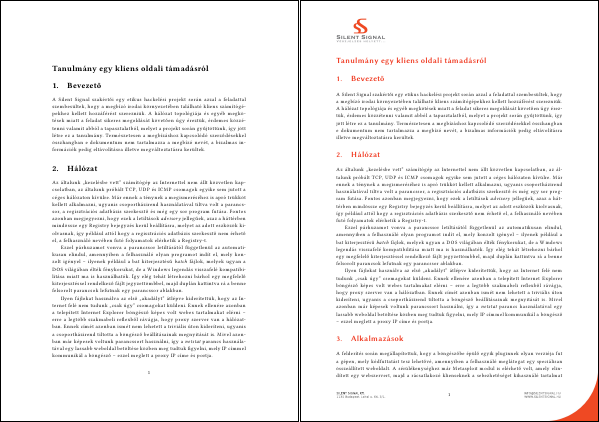
<p>Creating a package comes with the advantage, that only a single line needs
to be added to a document to use all the formatting described above, just
like with CSS. The following two documents only differ such that the one
on the right has an extra <code>\usepackage{s2}</code> line in the header.</p>

<p><img src="https://techblog.vsza.hu/images/word2latex-tpl.png" alt="Same document without and with style package" title="" /></p>

<p>Two documents published with this technique (although written in Hungarian)
can be downloaded: <a href="https://silentsignal.hu/docs/S2_Kliens_oldali_tamadas_tanulmany.pdf">the aforementioned writeup about client-side attacks</a>
and another <a href="https://silentsignal.hu/docs/S2_2011_vulns.pdf">one about things we did in 2011</a>.</p>
]]></content>
	</entry>
	<entry>
		<title>Accented characters in hyperref PDF fields</title>
		<link rel="alternate" type="text/html" href="https://techblog.vsza.hu/posts/Accented_characters_in_hyperref_PDF_fields.html"/>
		<updated>2012-01-18T00:41:33+01:00</updated>
      <id>https://techblog.vsza.hu/posts/Accented_characters_in_hyperref_PDF_fields.html</id>
      <author><name>dnet</name></author>
		<category term="POSTCATEGORY" scheme="http://www.sixapart.com/ns/types#category"/>
		<content type="html" xml:lang="en" xml:base="https://techblog.vsza.hu"><![CDATA[
      <p>I've always found <a href="https://en.wikibooks.org/wiki/LaTeX/Hyperlinks">hyperref</a> one of the best features of LaTeX, and although
it supported Unicode, certain accented characters (in my case, ő and ű) were
treated abnormally in case of PDF metadata fields, such as author and title.
I mostly ignored the issue and reworded the contents, until I met a situation,
where changing the data was not an option. To illustrate the issue, the
following example was saved as <code>wrong.tex</code> and got compiled with the
<code>pdflatex wrong.tex</code> command.</p>

<pre><code>\documentclass{report}

\usepackage[utf8]{inputenc}
\usepackage[T1]{fontenc}
\usepackage[unicode, pdftitle={Árvíztűrő tükörfúrógép}]{hyperref}

\begin{document}
foobar
\end{document}
</code></pre>

<p>The result could be checked with <code>pdfinfo</code> and was far from what I expected.</p>

<pre><code class="no-highlight">$ pdfinfo wrong.pdf | grep Title
Title:          Árvízt¶r® tükörfúrógép
</code></pre>

<p>I searched the web, and was disappointed at first, having found unsolved forum
threads, such as <a href="http://www.latex-community.org/forum/viewtopic.php?f=5&amp;t=1124">one written by also a Hungarian</a>. Finally, I opened up the
TeX section of the Stack Exchange network, and started typing a title for my
question. Based on this, the forum offered a number of probably related posts,
and I browsed through them out of curiosity. As it turned out, the solution
lied within <a href="http://tex.stackexchange.com/a/35666/10817">a post about Polish characters in pdftitle</a>, and in retrospect,
it seems obvious – like any other great idea. As <a href="http://tex.stackexchange.com/users/9057/schweinebacke">Schweinebacke</a> writes,
“The optional argument of <code>\usepackage</code> is read by the LaTeX kernel, so hyperref
cannot change scanning of the argument”. The problem can be eliminated simply by
moving the title setup into a separate <code>\hypersetup</code> command – and behold, the
pilcrow and the registered sign is gone, as seen in the following example.</p>

<pre><code class="no-highlight">$ diff wrong.tex right.tex
5c5,6
&lt; \usepackage[unicode, pdftitle={Árvíztűrő tükörfúrógép}]{hyperref}
---
&gt; \usepackage[unicode]{hyperref}
&gt; \hypersetup{pdftitle={Árvíztűrő tükörfúrógép}}
$ pdfinfo right.pdf | grep Title
Title:          Árvíztűrő tükörfúrógép
</code></pre>
]]></content>
	</entry>
</feed>