<?xml version="1.0" encoding="utf-8"?>
<feed xmlns="http://www.w3.org/2005/Atom">
	<title>VSzA techblog</title>
	<link rel="alternate" type="text/html" href="https://techblog.vsza.hu/"/>
	<link rel="self" type="application/atom+xml" href="https://techblog.vsza.hu/atom.xml"/>
	<updated>2013-06-13T17:19:16+02:00</updated>
   <generator uri="http://github.com/stef/utterson">utterson v0.4</generator>
   <id>https://techblog.vsza.hu/</id>
	<entry>
		<title>Using TOR to evade Play Store geoban</title>
		<link rel="alternate" type="text/html" href="https://techblog.vsza.hu/posts/Using_TOR_to_evade_Play_Store_geoban.html"/>
		<updated>2013-06-13T17:19:16+02:00</updated>
      <id>https://techblog.vsza.hu/posts/Using_TOR_to_evade_Play_Store_geoban.html</id>
      <author><name>dnet</name></author>
		<category term="POSTCATEGORY" scheme="http://www.sixapart.com/ns/types#category"/>
		<content type="html" xml:lang="en" xml:base="https://techblog.vsza.hu"><![CDATA[
      <p>At Sil&#x65;nt Signal, we use Amazon Web Services for various purposes (no, we don't
run code that handles sensitive information or store such material without
end-to-end encryption in the cloud), and when I read that <a href="http://aws.amazon.com/mfa/">multi factor
authentication is available for console login</a>, I wanted to try it. Amazon
even had <a href="http://aws.amazon.com/mfa/">an app called AWS virtual MFA</a> in the Play Store and
<a href="https://play.google.com/store/apps/details?id=com.amazonaws.mobile.apps.Authenticator">in their appstore</a>, but I couldn't find them on my Nexus S, so I tried
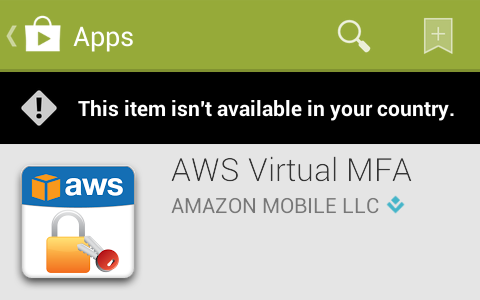
a different approach by opening a direct link. The following message confirmed
that I couldn't find it beacuse someone found it a good idea to geoban this
application, so it wasn't available in Hungary.</p>

<p><img src="https://techblog.vsza.hu/images/aws-mfa-geoban.png" alt="Geoban in Play Store on AWS virtual MFA" title="" /></p>

<p>Although a month ago I found a way to <a href="https://techblog.vsza.hu/posts/Using_Android_emulator_with_Burp_Suite.html">use Burp with the Android emulator</a>,
but this time, I didn't want to do a man-in-the-middle attack, but rather just
redirect all traffic through an Internet connection in a country outside the
geoban. I chose the United States, and configured <a href="https://www.torproject.org/">TOR</a> to select an exit node
operating there by appending the <a href="http://www.2byts.com/2012/03/09/how-to-configure-the-exit-country-on-tor-network/">following two lines</a> to <code>torrc</code>.</p>

<pre><code>ExitNodes {us}
StrictExitNodes 1
</code></pre>

<p>TOR was listening on port 9050 as a SOCKS proxy, but Android needs an HTTP one,
so I installed <a href="http://www.privoxy.org/">Privoxy</a> using <code>apt-get install privoxy</code>, and just
uncommented a line in the Debian default configuration file
<code>/etc/privoxy/config</code> that enabled TOR as an upstream proxy.</p>

<pre><code>forward-socks5   /               127.0.0.1:9050 .
</code></pre>

<p>For some reason, the Android emulator didn't like setting Privoxy as the HTTP
proxy – HTTP connections worked, but in case of HTTPS ones, the emulator just
closed the connection with a FIN just after receiving the SSL Server Hello
packet, as it can be seen below in the output of Wireshark.</p>

<p><img src="https://techblog.vsza.hu/images/server-hello-fin-617.png" alt="Android emulator sending a FIN right after SSL Server Hello" title="" /></p>

<p>Even disconnecting TOR from Privoxy didn't help, so after 30 minutes of trials,
I found another way to set a proxy in the Android emulator – or any device for
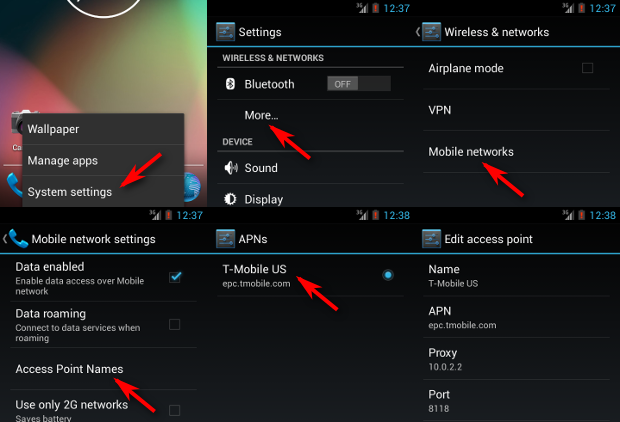
that matter. The six steps are illustrated on the screenshots below, and the
essence is that the emulator presents the network as an Access Point, and such
APs can have a proxy associated with them. The QEMU NAT used by the Android
emulator makes the host OS accessible on 10.0.2.2, so setting this up with
the default Privoxy port 8118 worked for the first try.</p>

<p><img src="https://techblog.vsza.hu/images/android-proxy-6pack.png" alt="Setting up an Access Point proxy in Android" title="" /></p>

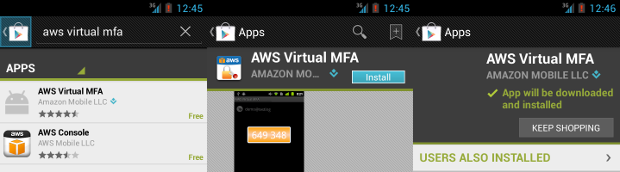
<p>I installed Play Store by following <a href="http://stackoverflow.com/a/11213598/246098">a Stack Overflow answer</a>, and as it can
be seen below, it appeared in the search results and I was able to install it –
although the process was pretty slow, and some images are missing from the
screenshots below because the latency of TOR was so high that I didn't wait for
them to be loaded.</p>

<p><img src="https://techblog.vsza.hu/images/aws-mfa-install.png" alt="Installing AWS virtual MFA from Play Store over TOR" title="" /></p>

<p>Having the app installed on the emulator, it's trivial to get the APK file that
can be installed on any device now, even those without network connection.</p>

<pre><code class="no-highlight">&#x24; adb pull /data/app/com.amazonaws.mobile.apps.Authenticator-1.apk .
837 KB/s (111962 bytes in 0.130s)
&#x24; file com.amazonaws.mobile.apps.Authenticator-1.apk
com.amazonaws.mobile.apps.Authenticator-1.apk: Zip archive data, at least v2.0 to extract
&#x24; ls -l com.amazonaws.mobile.apps.Authenticator-1.apk
-rw-r--r-- 1 dnet dnet 111962 jún   13 14:49 com.amazonaws.mobile.apps.Authenticator-1.apk
</code></pre>
]]></content>
	</entry>
	<entry>
		<title>F33dme vs. Django 1.4 HOWTO</title>
		<link rel="alternate" type="text/html" href="https://techblog.vsza.hu/posts/F33dme_vs._Django_1.4_HOWTO.html"/>
		<updated>2013-05-31T14:17:04+02:00</updated>
      <id>https://techblog.vsza.hu/posts/F33dme_vs._Django_1.4_HOWTO.html</id>
      <author><name>dnet</name></author>
		<category term="POSTCATEGORY" scheme="http://www.sixapart.com/ns/types#category"/>
		<content type="html" xml:lang="en" xml:base="https://techblog.vsza.hu"><![CDATA[
      <p>Although <a href="https://github.com/asciimoo">asciimoo</a> unofficially abandoned it for <a href="https://github.com/asciimoo/potion">potion</a>, I've been
using <a href="https://github.com/asciimoo/f33dme">f33dme</a> with <a href="https://github.com/dnet/f33dme">slight modifications</a> as a feed reader since May
2011. On 4<sup>th</sup> May 2013, <a href="https://github.com/dnet/f33dme">Debian released Wheezy</a>, so when I
upgraded the server I ran my f33dme instance on, I got <a href="https://www.djangoproject.com/">Django</a> 1.4 along
with it. As with major upgrades, nothing worked after the upgrade, so I had
to tweak the code to make it work with the new release of the framework.</p>

<p>First of all, the database configuration in <code>settings.py</code> were just simple
key-value pairs like <code>DATABASE_ENGINE = 'sqlite3'</code>, these had to be replaced
with a more structured block like the one below.</p>

<pre><code class="python">DATABASES = {
    'default': {
        'ENGINE': 'sqlite3',
        ...
    }
}
</code></pre>

<p>Then starting the service using <code>manage.py</code> displayed the following error
message.</p>

<pre><code class="no-highlight">Error: One or more models did not validate:
admin.logentry: 'user' has a relation with model
    &lt;class 'django.contrib.auth.models.User'&gt;, which
    has either not been installed or is abstract.
</code></pre>

<p><a href="http://stackoverflow.com/a/13209045">Abdul Rafi wrote on Stack Overflow</a> that such issues could be solved by
adding <code>django.contrib.auth</code> to <code>INSTALLED_APPS</code>, and in case of f33dme, it
was already there, <a href="https://github.com/dnet/f33dme/commit/ef67410">I just had to uncomment it</a>. After this modification,
<code>manage.py</code> started without problems, but rendering the page resulted in the
error message below.</p>

<pre><code class="no-highlight">ImproperlyConfigured: Error importing template source loader
    django.template.loaders.filesystem.load_template_source: "'module'
    object has no attribute 'load_template_source'"
</code></pre>

<p>Searching the web for the text above led me to <a href="http://stackoverflow.com/q/11904609">another Stack Overflow
question</a>, and <a href="https://github.com/dnet/f33dme/commit/788153c">correcting the template loaders section in settings.py</a>
solved the issue. Although it's not a strictly Django-related problem, but
another component called <a href="https://code.google.com/p/feedparser/">feedparser</a> also got upgraded and started
returning such values that resulted in <code>TypeError</code> exceptions, so the
handler in fetch.py <a href="https://github.com/dnet/f33dme/commit/03cdb16">also had to be extended</a> to deal with such cases.</p>

<p>With the modifications described above, f33dme now works like a charm,
although deprecation warnings still get written to the logs both from
Django and feedparser, but these can be dealt with till the next Debian
upgrade, and until then, I have a working feed reader.</p>
]]></content>
	</entry>
	<entry>
		<title>LibreOffice 4.0 workaround for read-only FS</title>
		<link rel="alternate" type="text/html" href="https://techblog.vsza.hu/posts/LibreOffice_4.0_workaround_for_read-only_FS.html"/>
		<updated>2013-02-10T14:53:52+01:00</updated>
      <id>https://techblog.vsza.hu/posts/LibreOffice_4.0_workaround_for_read-only_FS.html</id>
      <author><name>dnet</name></author>
		<category term="POSTCATEGORY" scheme="http://www.sixapart.com/ns/types#category"/>
		<content type="html" xml:lang="en" xml:base="https://techblog.vsza.hu"><![CDATA[
      <p><a href="http://www.libreoffice.org/download/4-0-new-features-and-fixes/">LibreOffice 4.0</a> got released on 7<sup>th</sup> February, and since it
offered improved OOXML interoperability, I immediately downloaded and
installed it on my laptop. It worked quite well, but after the next boot, it
just flashed the window for a tenth of a second, and displayed the following
output on the console.</p>

<pre><code>Fatal Python error: Py_Initialize: Unable to get the locale encoding
Traceback (most recent call last):
  File "&lt;frozen importlib._bootstrap&gt;", line 1558, in _find_and_load
  File "&lt;frozen importlib._bootstrap&gt;", line 1525, in _find_and_load_unlocked
  File "&lt;frozen importlib._bootstrap&gt;", line 586, in _check_name_wrapper
  File "&lt;frozen importlib._bootstrap&gt;", line 1023, in load_module
  File "&lt;frozen importlib._bootstrap&gt;", line 1004, in load_module
  File "&lt;frozen importlib._bootstrap&gt;", line 562, in module_for_loader_wrapper
  File "&lt;frozen importlib._bootstrap&gt;", line 854, in _load_module
  File "&lt;frozen importlib._bootstrap&gt;", line 990, in get_code
  File "&lt;frozen importlib._bootstrap&gt;", line 1051, in _cache_bytecode
  File "&lt;frozen importlib._bootstrap&gt;", line 1065, in set_data
OSError: [Errno 30] Read-only file system: '/usr/local/opt/libreoffice4.0/program/../program/python-core-3.3.0/lib/encodings/__pycache__'
</code></pre>

<p>I symlinked <code>/opt</code> to <code>/usr/local/opt</code>, and for many reasons (including
faster boot, storing <code>/usr</code> on an SSD) I mount <code>/usr</code> in read-only mode by
default, and use the following snippet in <code>/etc/apt/apt.conf.d/12remount</code>
to do the magic upon system upgrade and software installs.</p>

<pre><code>DPkg
{
    Pre-Invoke {"mount -o remount,rw /usr &amp;&amp; mount -o remount,exec /var &amp;&amp; mount -o remount,exec /tmp";};
    Post-Invoke {"mount -o remount,ro /usr ; mount -o remount,noexec /var &amp;&amp; mount -o remount,noexec /tmp";};
}
</code></pre>

<p>It seems that LibreOffice 4.0 tries to put compiled Python objects into a
persistent cache, and since it resides on a read-only filesystem, it cannot
even create the <code>__pycache__</code> directories needed for that. My workaround is
the following shell script that needs to be ran just once, and works quite
well by letting LibreOffice put its cached <code>pyc</code> files into <code>/tmp</code>.</p>

<pre><code>#!/bin/sh
mount /usr -o rw,remount
find /opt/libreoffice4.0/program/python-core-3.3.0/lib -type d \
    -exec ln -s /tmp {}/__pycache__ \;
mount /usr -o ro,remount
</code></pre>
]]></content>
	</entry>
	<entry>
		<title>Four free software I started using in 2012</title>
		<link rel="alternate" type="text/html" href="https://techblog.vsza.hu/posts/Four_free_software_I_started_using_in_2012.html"/>
		<updated>2013-02-02T00:11:06+01:00</updated>
      <id>https://techblog.vsza.hu/posts/Four_free_software_I_started_using_in_2012.html</id>
      <author><name>dnet</name></author>
		<category term="POSTCATEGORY" scheme="http://www.sixapart.com/ns/types#category"/>
		<content type="html" xml:lang="en" xml:base="https://techblog.vsza.hu"><![CDATA[
      <p>At the end of 2012, I realized that two of the software I started using in that
year started with the letter 'm', and later, I remembered two other as well, so
here's this post to document what I used in 2013.</p>

<h4>mcabber (console XMPP a.k.a. Jabber client with built-in OTR support)</h4>

<p>In the last ten years, I always preferred IRC to XMPP/MSN Messenger/Skype since
although all of them has both the option to one-to-one and many-to-many chat,
latter is the common use-case for IRC while former is with all the others.
That's when <a href="https://www.ctrlc.hu/~stef/blog/">Stefan</a> showed me <a href="http://www.cypherpunks.ca/otr/">OTR</a> (Off-the-Record) messaging, which
provided strong autentication and encryption along with deniability afterwards.
We started experimenting with version 1 on IRC using <a href="http://irssi-otr.tuxfamily.org/">irssi-otr</a>, but found
it to be quite unstable, and another big problem was that I prefer to run irssi
on a remote server, which defies the whole purpose of the end-to-end security
OTR aims to provide.</p>

<p>So I decided to give it a try with XMPP, especially since
<a href="https://hsbp.org/">H.A.C.K.</a> has its own server – with registration available to anyone – at
<code>xmpp.hsbp.org</code>. Stefan recommended me <a href="http://mcabber.com/">mcabber</a> as a client, and although
it has its limitations (for example, it cannot connect to multiple servers and
I had to use <a href="http://pidgin.im/">Pidgin</a> for registration), I found it perfect for my
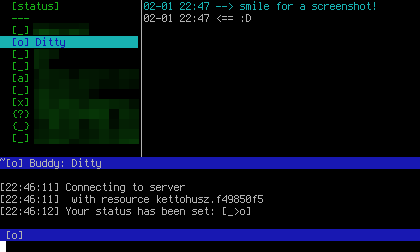
use-cases, as it has built-in support for OTR up to version 2, and has a nice
console UI.</p>

<p><img src="https://techblog.vsza.hu/images/mcabber-shot.png" alt="mcabber in action" title="" /></p>

<h4>minidlna (lightweight DLNA/UPnP media server)</h4>

<p>I didn't know what DLNA was before I got my hands on a device that actually
supported it, then I started using <a href="http://www.serviio.org/">Serviio</a>, but it had its limitations.
It required Java, updated the local repository really slow, had an awful and
complicated GUI – and had I mentioned it ran on Java? After a week, I started
looking for alternatives, I naïvely typed <code>apt-cache search dlna</code> and
that's how I <del>met</del> found <a href="http://sourceforge.net/projects/minidlna/">minidlna</a>, which was quite the opposite
of Serviio.</p>

<p>It consisted of a single native executable, a config file
and some docs, and since it's targeted at embedded systems, it ran quite fast
on my dual i3 notebook. The Debian version runs as an unprivileged user by
default, and I added my user to the <code>minidlna</code> group, so I can just drop/link
files into the <code>/var/lib/minidlna</code> directory, and they just become accessible
for any DLNA consumer. In case of content from Bittorrent, I can even
download it to a remote server, mount it with <a href="http://fuse.sourceforge.net/sshfs.html">sshfs</a> (also one of my
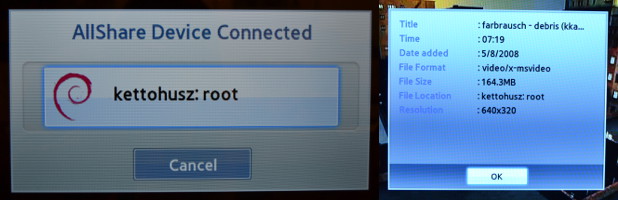
favorite solutions), symlink it into the directory, and the TV magically plays
the file from the remote server via my notebook over the home Wi-Fi, which
works suprisingly well even in case of HD contents. Also, on Debian, the DLNA
icon is a Debian swirl logo, so it even looks great in the TV menu. :)</p>

<p><img src="https://techblog.vsza.hu/images/minidlna-allshare.jpg" alt="minidlna in action" title="" /></p>

<h4>mosh (SSH <del>replacement</del> extension for roaming clients and laggy connections)</h4>

<p>I think SSH is one of those software that demonstrate the power of “the Unix
way” the best. I use it for lots of purposes, but at the same time, I've found it
really hard to use in case of laggy connections. I cannot even decide, which
one I hate better, both cellular data connections (GPRS, EDGE, 3G, etc.) and
suboptimal Wi-Fi networks can make me want to smash the keyboard. After using
<a href="http://mosh.mit.edu/">mosh</a> while uploading huge videos over a consumer-grade asymmetric uplink,
I also found that networks without QoS can also make the interactive SSH
experience turn into a text-based RPG.</p>

<p>I installed mosh on the two boxes I
most regularly log into via SSH, and found it really useful, especially since
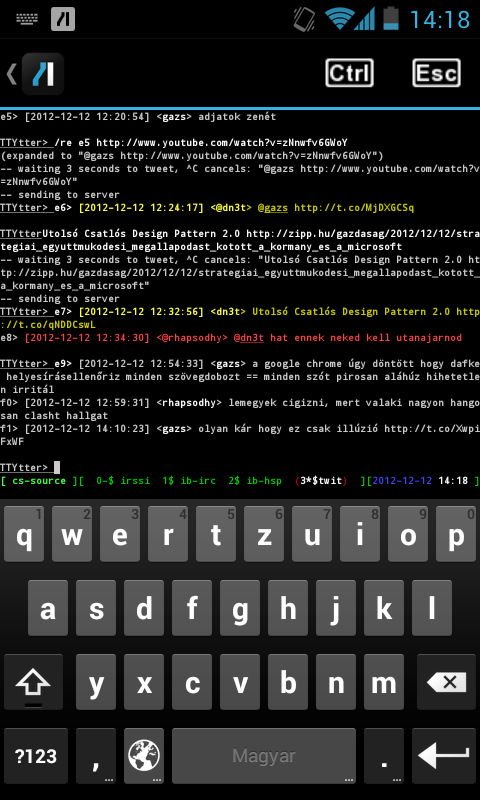
<a href="http://dan.drown.org/android/mosh/">Daniel Drown patched mosh support into ConnectBot</a>, an Android terminal
emulator and SSH client, which makes sense, since handheld devices have the
most chance to be connected to networks matching the description above. Although
some say it breaks interactive applications like VIM, I had no problems with
version 1.2.3 I downloaded and compiled almost two months ago, so if you also
find yourself connected to laggy networks, give it a try!</p>

<p><img src="https://vsza.hu/mosh-android.png" alt="mosh in action on Android" title="" /></p>

<h4>mutt (the mail user agent that sucks less)</h4>

<p>I've been a <a href="http://userbase.kde.org/KMail">KMail</a> user since around 2007 and although I saw many of my
friends using <a href="http://www.mutt.org/">mutt</a> with server-side magic, I used it just like my
window manager and my shell – a tool, which I used until it worked without
a hassle. When it <a href="http://bugs.debian.org/cgi-bin/bugreport.cgi?bug=588979">misbehaved</a> or <a href="http://bugs.debian.org/cgi-bin/bugreport.cgi?bug=590124">crashed</a> (it did so <a href="http://bugs.debian.org/cgi-bin/bugreport.cgi?bug=622986">quite a</a>
<a href="http://bugs.debian.org/cgi-bin/bugreport.cgi?bug=687382">few times</a>), I sent bugreports, partly to make myself feel better, partly
to evade “and have you reported it” questions, but I also hoped that they'll
fix these properly. Then one day, during an IMAP mass move operation, KMail
crashed, and did so even after restart. I've had quite an experience in
bruteforcing KMail into a working state from the past, but when I couldn't
change the situation in half an hour, I decided that it's time to change.</p>

<p>I had three mailboxes on two IMAPS servers with two distinct SMTPSA MTAs to
send mails through, and I also used client-side filtering extensively.
I migrated latter functionality to <a href="http://www.procmail.org/">procmail</a> on one of the servers,
and as of February 2013, I use a transitional setup with on-line IMAP
mailboxes and a local header cache. In the near future, I plan to migrate
online IMAP access to a solution based on <a href="http://offlineimap.org/">offlineimap</a> and run a
local MTA that forwards mail to the appropriate SMTP server, preferably
through a tunnel/VPN to avoid password authentication and my endpoint IP
address appearing in the MIME envelope.</p>

<p>I only had one problem so far, it
seems that the online IMAP functionality is not so well-tested in mutt, so
even though I use Debian testing, it crashed in around 30% of the cases
when changing IMAP directories, but I managed to solve it by compiling
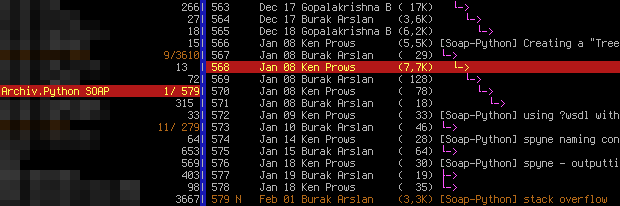
Mutt from source, including the <a href="http://www.lunar-linux.org/mutt-sidebar/">folder sidebar patch</a>. Here's how it
looks with the current config, displaying the Python SOAP mailing list.</p>

<p><img src="https://techblog.vsza.hu/images/mutt-shot.png" alt="mosh in action on Android" title="" /></p>
]]></content>
	</entry>
	<entry>
		<title>FFmpeg recipes for workshop videos</title>
		<link rel="alternate" type="text/html" href="https://techblog.vsza.hu/posts/FFmpeg_recipes_for_workshop_videos.html"/>
		<updated>2013-01-23T16:47:33+01:00</updated>
      <id>https://techblog.vsza.hu/posts/FFmpeg_recipes_for_workshop_videos.html</id>
      <author><name>dnet</name></author>
		<category term="POSTCATEGORY" scheme="http://www.sixapart.com/ns/types#category"/>
		<content type="html" xml:lang="en" xml:base="https://techblog.vsza.hu"><![CDATA[
      <p>In November 2012, I started doing <a href="https://hsbp.org/arduino#Arduino_workshop">Arduino workshops</a> in <a href="http://hackerspaces.org/wiki/Hackerspace_Budapest">H.A.C.K.</a>
and after I announced it on some local channels, some people <a href="http://hup.hu/node/119014#comment-1527012">asked if it
could be recorded and published</a>. At first, it seemed that recording
video would require the least effort to publish what we've done, and while
I though otherwise after the first one, now we have a collection of simple
and robust tools and snippets that glue them together that can be reused
for all future workshops.</p>

<p>The recording part was simple, I won't write about it outside this paragraph,
but although the following thoughts might seem trivial, important things
cannot be repeated enough times. Although the built-in microphones are great
for lots of purposes, unless you're sitting in a sil&#x65;nt room (no noise from
machines nor people) or you already use a microphone with an amplifier,
a microphone closer to the speaker should be used. We already got a cheap
lavalier microphone with a preamplifier and 5 meters of cable, so we used
that. It also helps if the camera operator has a headphone, so the volume
level can be checked, and you won't freak out after importing the video to
the PC that either the level is so low that it has lots of noise or it's so
high that it becomes distorted.</p>

<p>I used a DV camera, so running <code>dvgrab</code> resulted in <code>dvgrab-*.dv</code> files.
Although the automatic splitting is sometimes desireable (not just because of
crippled file systems, but it makes it possible to transfer each file after
it's closed, lowering the amount of drive space needed), if not, it can be
disabled by setting the split size to zero using <code>-size 0</code>. It's also handy
to enable automatic splitting upon new recordings with <code>-autosplit</code>. Finally,
<code>-timestamp</code> gives meaningful names to the files by using the metadata
recorded on the tape, including the exact date and time.</p>

<p>The camera I used had a stereo microphone and a matching stereo connector, but
the microphone was mono, with a connector that shorted the right channel and
the ground of the input jack, the audio track had a left channel carrying the
sound, and a right one with total sil&#x65;nce. My problem was that most software
handled channel reduction by calculating an average, so the amplitude of the
resulting mono track was half of the original. Fortunately, I found that
<a href="http://ffmpeg.org/">ffmpeg</a> is <a href="http://stackoverflow.com/a/10483086">capable of powerful audio panning</a>, so the following
parameter takes a stereo audio track, discards the right channel, and uses
the left audio channel as a mono output.</p>

<pre><code>-filter_complex "pan=1:c0=c0"
</code></pre>

<p>I also wanted to have a little watermark in the corner to inform viewers about
the web page of our hackerspace, so I created an image with matching resolution
in GIMP, wrote the domain name in the corner, and made it semi-transparent.
I used this method with Mencoder too, but FFmpeg can handle PNGs with 8-bit
alpha channels out-of-the-box. The following, combined command line adds the
watermark, fixes the audio track, and encodes the output using <a href="https://en.wikipedia.org/wiki/H.264/MPEG-4_AVC">H.264</a>
into an MKV container.</p>

<pre><code class="no-highlight">&#x24; ffmpeg -i input.dv -i watermark.png -filter_complex "pan=1:c0=c0" \
    -filter_complex 'overlay' -vcodec libx264 output.mkv
</code></pre>

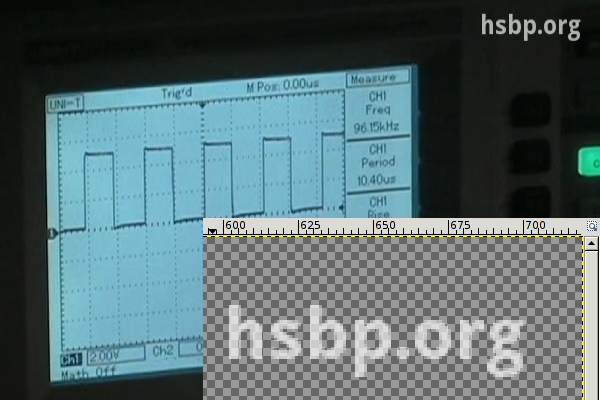
<p>A cropped sample frame of the output can be seen below, with the zoomed
watermark opened in GIMP in the corner.</p>

<p><img src="https://techblog.vsza.hu/images/hsbp.org-watermark.png" alt="hsbp.org watermark" title="" /></p>

<p>I chose MKV (<a href="https://en.wikipedia.org/wiki/Matroska">Matroska</a>) because of the great tools provided by
<a href="http://www.bunkus.org/videotools/mkvtoolnix/">MKVToolNix</a> (packaged under the same name in lowercase for Debian and
Ubuntu) that make it possible to merge files later in a safe way. Merging
was needed in my case for two reasons.</p>

<ul>
<li>If I had to work with split <code>.dv</code> files, I converted them to <code>.mkv</code> files
 one by one, and merged them in the end.</li>
<li>I wanted to add a title to the beginning, which also required a merge with
 the recorded material.</li>
</ul>

<p>I tried putting the title screen together from scratch, but I found it much
easier to take the first 8 seconds of an already done MKV using <code>mkvmerge</code>,
then placed a fully opaque title image of matching size using the overlay I
wrote about above, and finally replace the sound with sil&#x65;nce. In terms of
shell commands, it's like the following.</p>

<pre><code>ffmpeg -i input.mkv -i title.png -filter_complex 'overlay' -an \
    -vcodec libx264 title-img.mkv
mkvmerge -o title-img-8s.mkv --split timecodes:00:00:08 title-img.mkv
rm -f title-img-8s-002.mkv
ffmpeg -i title-img-8s-001.mkv -f lavfi -i "aevalsrc=0::s=48000" \
    -shortest -c:v copy title.mkv
rm -f title-img-8s-001.mkv
</code></pre>

<p>The first FFmpeg invocation disables audio using the <code>-an</code> switch, and produces
<code>title-img.mkv</code> that contains our PNG image in the video track, and has no
audio. Then <code>mkvmerge</code> splits it into two files, an 8 seconds long
<code>title-img-8s-001.mkv</code>, and the rest as <code>title-img-8s-002.mkv</code>. Latter gets
discarded right away, and a second FFmpeg invocation adds an audio track
containing nothing but sil&#x65;nce with a frequency (48 kHz) matching that of the
recording. The <code>-c:v copy</code> parameter ensures that no video recompression is
done, and <code>-shortest</code> discourages FFmpeg from trying to read as long as at
least one input has data, since <code>aevalsrc</code> would generate sil&#x65;nce forever.</p>

<p>Finally, the title(s) and recording(s) can be joined together by using
<code>mkvmerge</code> for the purpose its name suggest at last. If you're lucky, the
command line is as simple as the following:</p>

<pre><code class="no-highlight">&#x24; mkvmerge -o workshop.mkv title.mkv + rec1.mkv + rec2.mkv
</code></pre>

<p>If you produced your input files using the methods described above, if it
displays an error message, it's almost certainly the following (since all
resolution/codec/etc. parameters should match, right?).</p>

<pre><code class="no-highlight">No append mapping was given for the file no. 1 ('rec1.mkv'). A default
mapping of 1:0:0:0,1:1:0:1 will be used instead. Please keep that in mind
if mkvmerge aborts with an error message regarding invalid '--append-to'
options.
Error: The track number 0 from the file 'dvgrab-001.mkv' cannot be
appended to the track number 0 from the file 'title.mkv'. The formats do
not match.
</code></pre>

<p>As the error message suggests, the order of the tracks can differ between MKV
files, so an explicit mapping must be provided to <code>mkvmerge</code> for matching the
tracks befor concatenation. The mapping for the most common case (a single audio
and a single video track) is the following.</p>

<pre><code class="no-highlight">&#x24; mkvmerge -o workshop.mkv t.mkv --append-to '1:0:0:1,1:1:0:0' + r1.mkv
</code></pre>

<p>I've had a pretty good experience with H.264-encoded MKV files, the size stayed
reasonable, and most players had no problem with it. It also supports subtitles,
and since YouTube and other video sharing sites accept it as well, with these
tips, I hope it gets used more in recording and publishing workshops.</p>
]]></content>
	</entry>
	<entry>
		<title>Complementing Python GPGME with M2Crypto</title>
		<link rel="alternate" type="text/html" href="https://techblog.vsza.hu/posts/Complementing_Python_GPGME_with_M2Crypto.html"/>
		<updated>2012-12-31T20:00:59+01:00</updated>
      <id>https://techblog.vsza.hu/posts/Complementing_Python_GPGME_with_M2Crypto.html</id>
      <author><name>dnet</name></author>
		<category term="POSTCATEGORY" scheme="http://www.sixapart.com/ns/types#category"/>
		<content type="html" xml:lang="en" xml:base="https://techblog.vsza.hu"><![CDATA[
      <p>While the <a href="http://www.gnupg.org/related_software/gpgme/">GPGME</a> Python bindings provide interface to most of the
functionality provided by <a href="http://www.gnupg.org/">GnuPG</a>, so I could generate keys and perform
encryption and decryption using them, I found that it wasn't possible to
list, which public keys can decrypt a PGP encrypted file. Of course, it's
always a possibility to invoke the <code>gpg</code> binary, but I wanted to avoid
spawning processes if possible.</p>

<p>As <a href="http://stackoverflow.com/a/1042139">Heikki Toivonen mentioned in a Stack Overflow thread</a>, the
<a href="http://chandlerproject.org/Projects/MeTooCrypto">M2Crypto</a> library had a PGP module, and based on a <a href="http://svn.osafoundation.org/m2crypto/trunk/demo/pgp/pgpstep.py">demo code</a>, it
seemed to be able to parse OpenPGP files into meaningful structures, including
<code>pke_packet</code> that contains an attribute called <code>keyid</code>. I installed the module
from the Debian package <code>python-m2crypto</code>, tried calling the PGP parser
functionality, and found that</p>

<ul>
<li>the <code>keyid</code> attribute is called <code>_keyid</code> now, and</li>
<li>after returning the <code>pke_packet</code> instances, it raises an <code>XXXError</code> in
 case of OpenPGP output generated by GnuPG 1.4.12.</li>
</ul>

<p>It's also important to note that the M2Crypto keyid is an 8 bytes long raw
byte string, while GPGME uses 16 characters long uppercase hex strings for the
same purpose. I chose to convert the former to the latter format, resulting in
a <code>set</code> of hexadecimal key IDs. Later, I could check, which keys available in
the current keyring are able to decrypt the file. The <code>get_acl</code> function thus
returns a <code>dict</code> mapping e-mail addresses to a boolean value that indicates
the key's ability to decrypt the file specified in the <code>fil&#x65;name</code> parameter.</p>

<pre><code>from M2Crypto import PGP
from contextlib import closing
from binascii import hexlify
import gpgme

def get_acl(fil&#x65;name):
    with file(fil&#x65;name, 'rb') as stream:
        with closing(PGP.packet_stream(stream)) as ps:
            own_pk = set(packet_stream2hexkeys(ps))
    return dict(
            (k.uids[0].email, any(s.keyid in own_pk for s in k.subkeys))
            for k in gpgme.Context().keylist())

def packet_stream2hexkeys(ps):
    try:
        while True:
            pkt = ps.read()
            if pkt is None:
                break
            elif pkt and isinstance(pkt, PGP.pke_packet):
                yield hexlify(pkt._keyid).upper()
    except:
        pass
</code></pre>
]]></content>
	</entry>
	<entry>
		<title>Using MS Word templates with LaTeX quickly</title>
		<link rel="alternate" type="text/html" href="https://techblog.vsza.hu/posts/Using_MS_Word_templates_with_LaTeX_quickly.html"/>
		<updated>2012-09-12T21:34:16+02:00</updated>
      <id>https://techblog.vsza.hu/posts/Using_MS_Word_templates_with_LaTeX_quickly.html</id>
      <author><name>dnet</name></author>
		<category term="POSTCATEGORY" scheme="http://www.sixapart.com/ns/types#category"/>
		<content type="html" xml:lang="en" xml:base="https://techblog.vsza.hu"><![CDATA[
      <p>After a successful penetration test, I wanted to publish a detailed writeup
about it, but the template we use at the company that includes a logo and
some text in the footer was created using Microsoft Word, and I prefer using
LaTeX for typesetting. It would have been possible to recreate the template
from scratch, but I preferred to do it quick and, as it turned out, not so
dirty.</p>

<p>First, I saved a document written using the template from Word to PDF, opened
it up in <a href="http://inkscape.org/">Inkscape</a> and removed the body (e.g. everything except the header
and the footer). Depending on the internals of the PDF saving mechanism, it
might be necessary to use <em>ungroup</em> one or more times to avoid removing more
than needed. After this simple editing, I saved the result as another PDF,
called <code>s2bg.pdf</code>.</p>

<p>Next, I created a file named <code>s2.sty</code> with the following lines.</p>

<pre><code>\ProvidesPackage{s2}

\RequirePackage[top=4cm, bottom=2.8cm, left=2.5cm, right=2.5cm]{geometry}
\RequirePackage{wallpaper}
\CenterWallPaper{1}{s2bg.pdf}
</code></pre>

<p>The first line sets the package name, while the next three adjust the margins
(which I calculated by using the ones set in Word and some trial and error)
and put the PDF saved in Inkscape to the background of every page. The
<a href="http://www.ctan.org/tex-archive/macros/latex/contrib/wallpaper">wallpaper</a> package is available in the <a href="http://packages.debian.org/texlive-latex-extra">texlive-latex-extra</a> package
on Debian systems.</p>

<p>As our company uses a specific shade of orange as a primary color, I also
changed the <code>\section</code> command to use this color for section headings.</p>

<pre><code>\RequirePackage{color}
\definecolor{s2col}{RGB}{240, 56, 31}

\makeatletter
\renewcommand{\section}{\@startsection{section}{1}{0mm}
{\baselineskip}%
{\baselineskip}{\normalfont\Large\sffamily\bfseries\color{s2col}}}%
\makeatother
</code></pre>

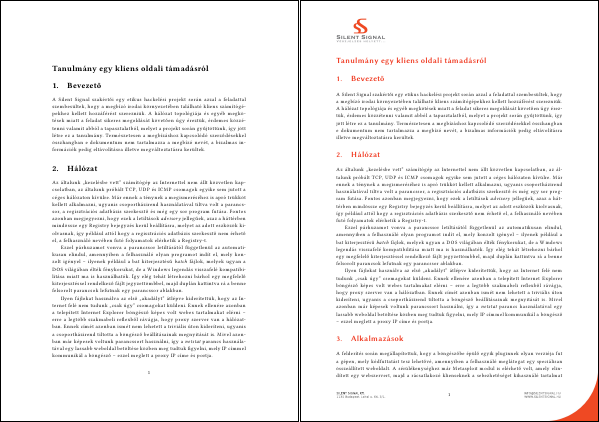
<p>Creating a package comes with the advantage, that only a single line needs
to be added to a document to use all the formatting described above, just
like with CSS. The following two documents only differ such that the one
on the right has an extra <code>\usepackage{s2}</code> line in the header.</p>

<p><img src="https://techblog.vsza.hu/images/word2latex-tpl.png" alt="Same document without and with style package" title="" /></p>

<p>Two documents published with this technique (although written in Hungarian)
can be downloaded: <a href="https://silentsignal.hu/docs/S2_Kliens_oldali_tamadas_tanulmany.pdf">the aforementioned writeup about client-side attacks</a>
and another <a href="https://silentsignal.hu/docs/S2_2011_vulns.pdf">one about things we did in 2011</a>.</p>
]]></content>
	</entry>
	<entry>
		<title>Installing CAcert on Android without root</title>
		<link rel="alternate" type="text/html" href="https://techblog.vsza.hu/posts/Installing_CAcert_on_Android_without_root.html"/>
		<updated>2012-08-16T14:29:28+02:00</updated>
      <id>https://techblog.vsza.hu/posts/Installing_CAcert_on_Android_without_root.html</id>
      <author><name>dnet</name></author>
		<category term="POSTCATEGORY" scheme="http://www.sixapart.com/ns/types#category"/>
		<content type="html" xml:lang="en" xml:base="https://techblog.vsza.hu"><![CDATA[
      <p>I've been using <a href="http://cacert.org/">CAcert</a> for securing some of my services with TLS/SSL, and
when I got my Android phone I <a href="https://techblog.vsza.hu/posts/Adding_certificate_checksum_to_K-9_Mail.html">chose K-9 mail over the stock e-mail client</a>
because as the <a href="http://wiki.cacert.org/FAQ/ImportRootCert#Android_Phones">certificate installation page on the official CAcert site</a>
stated, it required root access to access the system certificate store. Now,
one year and two upgrades (ICS, JB) later, I revisited the issue.</p>

<p>As of this writing, the CAcert site contains another method that also requires
root access, but as <a href="http://www.jethrocarr.com/2012/01/04/custom-ca-certificates-and-android/">Jethro Carr wrote in his blog</a>, since at least ICS,
it's possible to install certificates without any witchcraft, using not only
PKCS12 but also PEM files. Since <a href="http://packages.debian.org/sid/all/ca-certificates/filelist">Debian ships the CAcert bundle</a>, I used
that file, but it's also possible to download the files from
<a href="http://www.cacert.org/index.php?id=3">the official CAcert root certificate download page</a>. Since I have Android
SDK installed, I used <code>adb</code> (Android Debug Bridge) to copy the certificate to
the SD card, but any other method (browser, FTP, e-mail, etc.) works too.</p>

<pre><code class="no-highlight">&#x24; adb push /usr/share/ca-certificates/cacert.org/cacert.org.crt /sdcard/
2 KB/s (5179 bytes in 1.748s)
</code></pre>

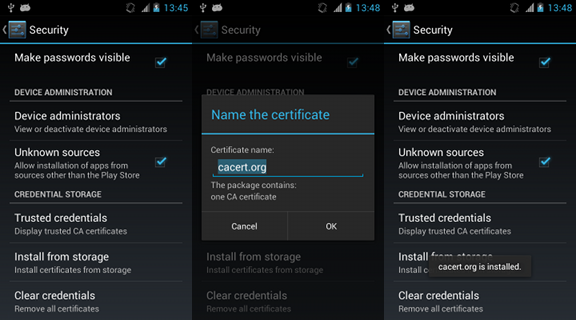
<p>On the phone, I opened <em>Settings > Security</em>, scrolled to the bottom, and
selected <em>Install from storage</em>. It prompted for a name of the certificate,
and installed the certificate in a second without any further questions asked.</p>

<p><img src="https://techblog.vsza.hu/images/cacert-android-install.png" alt="Installing the CAcert root certificate on Android" title="" /></p>

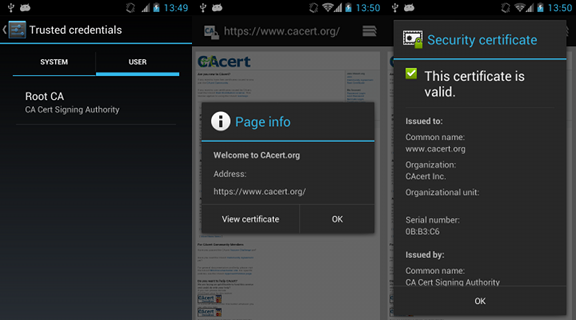
<p>After this, the certificate can be viewed and by opening <em>Trusted credentials</em>
and selecting the <em>User</em> tab, and browsing an HTTPS site with a CAcert-signed
certificate becomes just as painless and secure as with any other built-in CA.</p>

<p><img src="https://techblog.vsza.hu/images/cacert-android-usage.png" alt="Using CAcert root certificate on Android" title="" /></p>
]]></content>
	</entry>
	<entry>
		<title>Mounting Sympa shared directories with FUSE</title>
		<link rel="alternate" type="text/html" href="https://techblog.vsza.hu/posts/Mounting_Sympa_shared_directories_with_FUSE.html"/>
		<updated>2012-03-29T17:35:37+02:00</updated>
      <id>https://techblog.vsza.hu/posts/Mounting_Sympa_shared_directories_with_FUSE.html</id>
      <author><name>dnet</name></author>
		<category term="POSTCATEGORY" scheme="http://www.sixapart.com/ns/types#category"/>
		<content type="html" xml:lang="en" xml:base="https://techblog.vsza.hu"><![CDATA[
      <p>The <a href="https://www.db.bme.hu/">database laboratory course</a> at the Budapest University of Technology
and Economics which I collaborate with as a lecturer uses Sympa for mailing
lists and file sharing. Latter is not one of the most used features of this
software, and the web interface feels sluggish, not to mention the lots of
leftover files in my Downloads directory for each attempt to view one page
of a certain file. I understood that using the same software for these two
tasks made managing user accounts easier, so I tried to come up with a
solution that makes it easier to handle these files with the existing setup.</p>

<p>First, I searched whether an API for Sympa exists and I found that while they
created the <a href="https://www.sympa.org/manual/soap">Sympa SOAP server</a>, it only handles common use-cases related
to mailing lists management, so it can be considered a dead end. This meant
that my solution had to use the web interface, so I selected an old and a new
tool for the task: <a href="http://lxml.de/">LXML</a> for parsing, since I already knew of its power,
and <a href="http://docs.python-requests.org/">requests</a> for handling HTTP, because of its fame. These two tools made
it possible to create half of the solution first, resulting in a <a href="https://github.com/dnet/sympa-python-api/blob/master/sympa.py">Sympa API</a>
that can be used independently of the file system bridge.</p>

<p>Two things I found particularly great about requests were that its handling of
sessions was superior than any APIs I've ever seen, and that it was possible to
retrieve the <a href="http://docs.python-requests.org/en/v0.10.7/user/quickstart/#response-content">results in multiple formats</a> (raw socket, bytes, Unicode text).
Since I only had one Sympa installation to test with, I only hacked the code so
far to make it work, so for example, I had to use regular expressions to strip
the XML <em>and</em> HTML encoding information, since both stated <code>us-ascii</code> while the
output was in ISO-8859-2, correctly stated in the HTTP <code>Content-type</code> header.</p>

<p>In the second half of the time, I had to create a bridge between the file
system and the API I created, and <a href="http://fuse.sourceforge.net/">FUSE</a> was my natural choice. Choosing the
Python binding was not so easy, as a Debian user, the <code>python-fuse</code> package
seemed like a logical choice, but as <a href="http://stackoverflow.com/users/149482/matt-joiner">Matt Joiner</a> wrote in his answer on a
<a href="http://stackoverflow.com/a/5044703/246098">related Stack Overflow question</a>, <a href="http://code.google.com/p/fusepy/">fusepy</a> was a better choice. Using
one of the examples, I managed to build an experimental version of
<a href="https://github.com/dnet/sympa-python-api/blob/master/sympafs.py">SympaFS</a> with naive caching and session management, but it works!</p>

<pre><code class="no-highlight">&#x24; mkdir /tmp/sympa
&#x24; python sympafs.py https://foo.tld/lists foo@bar.tld adatlabor /tmp/sympa
Password:
&#x24; mount | fgrep sympa
SympaFS on /tmp/sympa type fuse (rw,nosuid,nodev,relatime,user_id=1000,
group_id=1000)
&#x24; ls -l /tmp/sympa/2012
összesen 0
-r-xr-xr-x 1 root root  11776 febr   9 00:00 CensoredFile1.doc
-r-xr-xr-x 1 root root 161792 febr  22 00:00 CensoredFile2.xls
-r-xr-xr-x 1 root root  39424 febr   9 00:00 CensoredFile3.doc
dr-xr-xr-x 2 root root      0 febr  14 00:00 CensoredDir1
dr-xr-xr-x 2 root root      0 ápr    4  2011 CensoredDir2
&#x24; file /tmp/sympa/2012/CensoredFile1.doc
Composite Document File V2 Document, Little Endian, Os: Windows, Version
5.1, Code page: 1252, Author: Censored, Last Saved By: User, Name of
Creating Application: Microsoft Excel, Last Printed: Tue Feb 14 15:00:39
2012, Create Time/Date: Wed Feb  8 21:51:10 2012, Last Saved Time/Date:
Wed Feb 22 08:10:20 2012, Security: 0
&#x24; fusermount -u /tmp/sympa
</code></pre>
]]></content>
	</entry>
	<entry>
		<title>Tracking history of docx files with Git</title>
		<link rel="alternate" type="text/html" href="https://techblog.vsza.hu/posts/Tracking_history_of_docx_files_with_Git.html"/>
		<updated>2012-03-27T20:00:01+02:00</updated>
      <id>https://techblog.vsza.hu/posts/Tracking_history_of_docx_files_with_Git.html</id>
      <author><name>dnet</name></author>
		<category term="POSTCATEGORY" scheme="http://www.sixapart.com/ns/types#category"/>
		<content type="html" xml:lang="en" xml:base="https://techblog.vsza.hu"><![CDATA[
      <p><a href="https://techblog.vsza.hu/posts/End-to-end_secure_REST_service_using_CakePHP.html">Just as with PHP</a>, OOXML, and specifically, docx is not my favorite format,
but when I use it, I prefer tracking the history using my preferred SCM of
choice, Git. What makes it perfect to track documents is not only the fact
that setting up a repository takes one command and a few miliseconds, but its
ability to use an external program to transform artifacts (files) to text
before displaying differences, which results in meaningful diffs.</p>

<p>The process of setting up an environment like this is described best in
<a href="http://progit.org/book/ch7-2.html">Chapter 7.2 of Pro Git</a>. The solution I found best to convert docx files
to plain text was <a href="http://docx2txt.sourceforge.net/">docx2txt</a>, especially since it's available as a Debian
package in the official repositories, so it takes only an <code>apt-get install
docx2txt</code> to have it installed on a Debian/Ubuntu box.</p>

<p>The only problem was that Git executes the text conversion program with the
name of the input file given as the first and only argument, and docx2txt
(in contrast with catdoc or antiword, which uses the standard output) saves
the text content of <code>foo.docx</code> in <code>foo.txt</code>. Because of this, I needed to
create a wrapper in the form of the following small shell script.</p>

<pre><code>#!/bin/sh
docx2txt &lt;&#x24;1
</code></pre>

<p>That being done, the only thing left to do is configuring Git to use this
wrapper for docx files by issuing the following commands in the root of
the repository.</p>

<pre><code class="no-highlight">&#x24; git config diff.docx.textconv /path/to/wrapper.sh
&#x24; echo "*.docx diff=docx" &gt;&gt;.git/info/attributes
</code></pre>
]]></content>
	</entry>
	<entry>
		<title>End-to-end secure REST service using CakePHP</title>
		<link rel="alternate" type="text/html" href="https://techblog.vsza.hu/posts/End-to-end_secure_REST_service_using_CakePHP.html"/>
		<updated>2012-03-14T20:50:35+01:00</updated>
      <id>https://techblog.vsza.hu/posts/End-to-end_secure_REST_service_using_CakePHP.html</id>
      <author><name>dnet</name></author>
		<category term="POSTCATEGORY" scheme="http://www.sixapart.com/ns/types#category"/>
		<content type="html" xml:lang="en" xml:base="https://techblog.vsza.hu"><![CDATA[
      <p>While PHP is not my favorite language and platform of choice, I have to admit
its ease of deployment, and that's one of the reasons I've used it to build
some of my web-related projects, including the <a href="https://github.com/dnet/hacksense-rest-api">REST API</a> and the
<a href="https://github.com/dnet/hacksense-png">PNG output</a> of <a href="https://vsza.hu/hacksense">HackSense</a>, and even the <a href="https://silentsignal.hu">homepage of my company</a>.
Some of these also used <a href="https://silentsignal.hu">CakePHP</a>, which tries to provide the flexibility
and “frameworkyness” of Ruby on Rails while keeping it easy to deploy. It also
has the <a href="http://book.cakephp.org/1.3/view/1239/The-Simple-Setup">capability of simple and rapid REST API development</a>, which I
often prefer to the bloatedness of SOAP.</p>

<p>One of the standardized non-functional services of SOAP is <a href="https://en.wikipedia.org/wiki/WS-Security">WS-Security</a>,
and while it's great for authentication and end-to-end signed messages,
<a href="http://www.w3.org/TR/xml&#x65;nc-core/">its encryption scheme</a> not only has a big overhead, but
<a href="http://dl.acm.org/citation.cfm?id=2046756&amp;dl=ACM&amp;coll=DL">it had been cracked</a> in 2011, thus cannot be considered secure. That being
said, I wanted a solution that can be applied to a REST API, does not waste
resources (e.g. spawning OS processes per HTTP call), and uses as many
existing code as feasible.</p>

<p>The solution I came up with is a new layout for CakePHP that uses the
<a href="http://www.php.net/manual/en/book.gnupg.php">GnuPG module of PHP</a>, which in turn uses the native GnuPG library.
This also means, that the keyring of the user running the web server
has to be used. Also, Debian (and thus Ubuntu) doesn't ship this module as a
package, so it needs to be compiled, but it's no big deal. Here's what I did:</p>

<pre><code class="no-highlight"># apt-get install libgpgme11-dev php5-dev
# wget http://pecl.php.net/get/gnupg-1.3.2.tgz
# tar -xvzf gnupg-1.3.2.tgz
# phpize &amp;&amp; ./configure &amp;&amp; make &amp;&amp; make install
# echo "extension=gnupg.so" &gt;/etc/php5/conf.d/gnupg.ini
# /etc/init.d/apache2 reload
</code></pre>

<p>These versions made sense in February 2012, so make sure that libgpgme, PHP
and the PHP GnuPG module refers to the latest version available. After the last
command has executed successfully, PHP scripts should be able to make use of
the GnuPG package. I crafted the following layout in <code>views/layouts/gpg.ctp</code>:</p>

<pre><code>&lt;?php

$gpg = new gnupg();
$gpg-&gt;addencryptkey(Configure::read('Gpg.enckey'));
$gpg-&gt;addsignkey(Configure::read('Gpg.sigkey'));
$gpg-&gt;setarmor(0);
$out = $gpg-&gt;encryptsign($content_for_layout);
header('Content-Length: ' . strl&#x65;n($out));
header('Content-Type: application/octet-stream');
print $out;

?&gt;
</code></pre>

<p>By using <code class="php">Configure::read($key)</code>, the keys used for making signatures and
encryption can be stored away from the code, I put the following two lines
in <code>config/core.php</code>:</p>

<pre><code class="php">Configure::write('Gpg.enckey', 'ID of the recipient's public key');
Configure::write('Gpg.sigkey', 'Fingerprint of the signing key');
</code></pre>

<p>And at last, actions that require this security layer only need a single line
in the controller code (e.g. <code>controllers/foo_controller.php</code>):</p>

<pre><code class="php">$this-&gt;layout = 'gpg';
</code></pre>

<p>Make sure to set this as close to the beginning of the function as you can to
avoid leaking error messages to attackers triggering errors in the code before
the layout is set to the secured one.</p>

<p>And that's it, the layout makes sure that all information sent from the view
is protected both from interception and modification. During testing, I favored
using armored output, I only disabled it after moving it to production, so if
it's needed, only two lines need modification: <code>setarmor(0)</code> should be
<code>setarmor(1)</code> and the <code>Content-Type</code> should be set to <code>text/plain</code>. Have fun!</p>
]]></content>
	</entry>
	<entry>
		<title>Proxmark3 vs. udev</title>
		<link rel="alternate" type="text/html" href="https://techblog.vsza.hu/posts/Proxmark3_vs._udev.html"/>
		<updated>2012-01-06T12:43:18+01:00</updated>
      <id>https://techblog.vsza.hu/posts/Proxmark3_vs._udev.html</id>
      <author><name>dnet</name></author>
		<category term="POSTCATEGORY" scheme="http://www.sixapart.com/ns/types#category"/>
		<content type="html" xml:lang="en" xml:base="https://techblog.vsza.hu"><![CDATA[
      <p>In the summer, I successfully <a href="https://techblog.vsza.hu/posts/How_I_made_Proxmark3_work.html">made my Proxmark3 work</a> by working around
every symptom of <a href="https://en.wikipedia.org/wiki/Bit_rot">bit rot</a> that made it impossible to run in a recent
environment. One bit that survived the aforementioned effect was the single
udev entry that solved the controversy of the principle of least privilege
and the need of raw USB access. As <a href="http://code.google.com/p/proxmark3/wiki/RunningPM3#Making_the_proxmark3_work_without_root_access">the official HOWTO mentioned</a>, putting
the following line into the udev configuration
(<code>/etc/udev/rules.d/026-proxmark.rules</code> on Debian) ensured that the Proxmark3
USB device node will be accessible by any user in the <code>dnet</code> group. </p>

<pre><code>SYSFS{idVendor}=="9ac4", SYSFS{idProduct}=="4b8f", MODE="0660", GROUP="dnet"
</code></pre>

<p>However, the <code>SYSFS{}</code> notation <a href="http://linuxindetails.wordpress.com/2009/12/30/udevd-sysfs-will-be-removed-in-a-future-udev-version-please-use-attr-to-match-the-event-device/">became obsolete</a> in newer udev releases,
and at first, I followed the instincts of a real programmer by disregarding
a mere warning. But with a recent udev upgrade, complete removal of support for
the obsolete notation came, so I had to face messages like the following on
every boot.</p>

<pre><code class="no-highlight">unknown key 'SYSFS{idVendor}' in /etc/udev/rules.d/026-proxmark.rules:1
invalid rule '/etc/udev/rules.d/026-proxmark.rules:1'
</code></pre>

<p>The solution is detailed on many websites, including the <a href="http://www.jpichon.net/blog/2011/12/debugging-udev-rules/">blogpost of jpichon</a>,
who also met the issue in a Debian vs. custom hardware situation. The line in
the udev configuration has to be changed to something like the following.</p>

<pre><code>SUBSYSTEM=="usb", ATTR{idVendor}=="9ac4", ATTR{idProduct}=="4b8f", MODE="0660", GROUP="dnet"
</code></pre>
]]></content>
	</entry>
	<entry>
		<title>Grsecurity missing GCC plugin</title>
		<link rel="alternate" type="text/html" href="https://techblog.vsza.hu/posts/Grsecurity_missing_GCC_plugin.html"/>
		<updated>2011-07-01T12:46:16+02:00</updated>
      <id>https://techblog.vsza.hu/posts/Grsecurity_missing_GCC_plugin.html</id>
      <author><name>dnet</name></author>
		<category term="POSTCATEGORY" scheme="http://www.sixapart.com/ns/types#category"/>
		<content type="html" xml:lang="en" xml:base="https://techblog.vsza.hu"><![CDATA[
      <p>The problem:</p>

<pre><code class="no-highlight">$ make -j4
scripts/kconfig/conf --silentoldconfig Kconfig
warning: (VIDEO_CX231XX_DVB) selects DVB_MB86A20S which has unmet direct dependencies (MEDIA_SUPPORT &amp;&amp; DVB_CAPTURE_DRIVERS &amp;&amp; DVB_CORE &amp;&amp; I2C)
  HOSTCC  -fPIC tools/gcc/pax_plugin.o
  tools/gcc/pax_plugin.c:19:24: fatal error: gcc-plugin.h: No such file or directory
  compilation terminated.
  make[1]: *** [tools/gcc/pax_plugin.o] Error 1
  make: *** [pax-plugin] Error 2
  make: *** Waiting for unfinished jobs....
</code></pre>

<p>The solution:</p>

<pre><code class="no-highlight"># apt-get install gcc-4.6-plugin-dev
</code></pre>
]]></content>
	</entry>
</feed>