<?xml version="1.0" encoding="utf-8"?>
<feed xmlns="http://www.w3.org/2005/Atom">
	<title>VSzA techblog</title>
	<link rel="alternate" type="text/html" href="https://techblog.vsza.hu/"/>
	<link rel="self" type="application/atom+xml" href="https://techblog.vsza.hu/atom.xml"/>
	<updated>2018-05-01T20:47:11+02:00</updated>
   <generator uri="http://github.com/stef/utterson">utterson v0.4</generator>
   <id>https://techblog.vsza.hu/</id>
	<entry>
		<title>My ACME wildcard certificate stack</title>
		<link rel="alternate" type="text/html" href="https://techblog.vsza.hu/posts/My_ACME_wildcard_certificate_stack.html"/>
		<updated>2018-05-01T20:47:11+02:00</updated>
      <id>https://techblog.vsza.hu/posts/My_ACME_wildcard_certificate_stack.html</id>
      <author><name>dnet</name></author>
		<category term="POSTCATEGORY" scheme="http://www.sixapart.com/ns/types#category"/>
		<content type="html" xml:lang="en" xml:base="https://techblog.vsza.hu"><![CDATA[
      <p>I was pretty excited when Let's Encrypt began their public beta on December 3, 2015.
I spent some time looking for the best client and finally <a href="https://crt.sh/?id=11949283">got my first certificate issued</a>
on January 11, 2016 using <a href="https://github.com/diafygi/acme-nosudo">acme-nosudo</a>, also known as letsencrypt-nosudo
back then. It was a nice solution as the source was short and sweet, and it didn't
require access to the certificate private key and even the account private key
was only touched by human-readable OpenSSL command line invocations.</p>

<p>As soon as Let's Encrypt became popular, people started demanding wildcard
certificates, and as it turned out, this marked the next milestone in my
ACME client stack. On March 13, 2018, wildcard support went live, and I
started doing my research again to find the perfect stack.</p>

<p>Although ACME (and thus Let's Encrypt) support many different methods of
validation, wildcard certificates could only be validated using <code>dns-02</code>.
This involves the ACME API giving the user a chall&#x65;nge, which must be
later returned in the TXT record of <code>_acme-chall&#x65;nge.domain.tld</code> thus
requires frequent access to DNS records. Most solutions solve the problem
by invoking APIs to the biggest DNS provider, however, I don't use any of
those and have no plan on doing so.</p>

<p>Fortunately, one day I bumped into <a href="https://github.com/joohoi/acme-dns">acme-dns</a>, which had an elegant
solution to this problem. Just like <code>http-01</code> and <code>http-02</code> validators follow
HTTP redirects, <code>dns-01</code> and <code>dns-02</code> behave in a similar way regarding CNAME
records. By running a tiny specialized DNS server with a simple API, and
pointing a CNAME record to a name that belongs to it, I could have my cake and
eat it too. I only had to create the CNAME record once per domain and that's it.</p>

<p>The next step was finding a suitable ACME client with support for <code>dns-02</code> and
wildcard certificates. While there are lots of ACMEv1 clients, adoption of
ACMEv2 is a bit slow, which limited my options. Also, since a whole new DNS API
had to be supported, I preferred to find a project in a programming language I
was comfortable contributing in.</p>

<p>This led me to <a href="https://github.com/komuw/sewer/">sewer</a>, written in Python, with full support for
<code>dns-02</code> and wildcard certificates, and infrastructure for DNS providers
plugins. Thus writing the code was pretty painless, and I submitted
<a href="https://github.com/komuw/sewer/pull/89">a pull request</a> on March 20, 2018. Since <a href="http://python-requests.org/">requests</a> was already
a dependency of the project, invoking the acme-dns HTTP API was painless, and
implementing the interface was pretty straightforward. The main problem was
finding the acme-dns subdomain since that's required by the HTTP API, while
there's no functionality in the Python standard library to query a TXT record.
I solved that using <a href="http://www.dnspython.org/">dnspython</a>, however, that involved adding a new
dependency to the project just for this small task.</p>

<p>I tested the result in the staging environment, which is something I'd recommend
for anyone playing with Let's Encrypt to avoid running into request quotas.
Interestingly, both the staging and production Let's Encrypt endpoints failed
for the first attempt but worked for subsequent requests (even lots of them),
so I haven't debugged this part so far. I <a href="https://crt.sh/?id=432314465">got my first certificate issued</a>
on April 28, 2018 using this new stack, and used the following script:</p>

<pre><code class="python">from sys import argv
import sewer

dns_class = sewer.AcmeDnsDns(
        ACME_DNS_API_USER='xxxxxxxx-xxxx-xxxx-xxxx-xxxxxxxxxxxx',
        ACME_DNS_API_KEY='yyyyyyyyyyyyyyyyyyyyyyyyyyyyyyyyyyyyyyyy',
        ACME_DNS_API_BASE_URL='http://127.0.0.1:zzzz',
        )

with open('/path/to/account.key', 'r') as f:
    account_key = f.read()

with open('/path/to/certificate.key', 'r') as f:
    certificate_key = f.read()

client = sewer.Client(domain_name='*.'+argv[1],
                      domain_alt_names=[argv[1]],
                      dns_class=dns_class,
                      account_key=account_key,
                      certificate_key=certificate_key,
#                     ACME_DIRECTORY_URL='https://acme-staging-v02...',
                      LOG_LEVEL='DEBUG',
                      )

certificate = client.cert()
with open(argv[1] + '.crt', 'w') as certificate_file:
    certificate_file.write(certificate)
</code></pre>

<p>By pointing all the CNAME records to the same acme-dns subdomain, I could
hardcode that, and even though there's an API key, I also set acme-dns to
listen on localhost only to limit exposure. By specifying the <code>ACME_DIRECTORY_URL</code>
optional argument in the <code>sewer.Client</code> constructor, the script can easily be
used on the staging Let's Encrypt infrastructure instead of the production one.
Also, at the time of this writing, <code>certificate_key</code> is not yet in mainline sewer,
so if you'd like to try it before it's merged, take a look at <a href="https://github.com/komuw/sewer/pull/93">my pull request
regarding this</a>.</p>
]]></content>
	</entry>
	<entry>
		<title>How to recalibrate the LCD of a Singer XL 1000</title>
		<link rel="alternate" type="text/html" href="https://techblog.vsza.hu/posts/How_to_recalibrate_the_LCD_of_a_Singer_XL_1000.html"/>
		<updated>2018-02-04T13:39:48+01:00</updated>
      <id>https://techblog.vsza.hu/posts/How_to_recalibrate_the_LCD_of_a_Singer_XL_1000.html</id>
      <author><name>dnet</name></author>
		<category term="POSTCATEGORY" scheme="http://www.sixapart.com/ns/types#category"/>
		<content type="html" xml:lang="en" xml:base="https://techblog.vsza.hu"><![CDATA[
      <p>My wife bought a Singer XL-1000 for 20% the original price, since the LCD was
taking touch input offset by such an amount that most of its functionality was
unreachable. The previous owner coudln't fix the problem and was glad that
someone took the machine away, and we were glad that we could buy a machine at
a price point lower than what such a machine would worth for us as a hobbyist
tool.</p>

<p>We started searching on the web, and while some people had this problem, no
usable solutions were posted. The <a href="http://www.singerco.com/uploads/download/8332a66e46ddc22f7bc62f0139bf8fbd03c55b23.pdf">users manual</a> was available online, but had
no mention of such an option. There was also a <a href="http://videos.jennys-sewing-studio.com/main.php?g2_view=core.DownloadItem&amp;g2_itemId=5140">service manual</a> available,
but it also lacked any direct description of the procedure. However, it had
instructions on opening service mode features, which eventually led me to
discover the steps described below. (See page 35 from latter link above.)</p>

<ol>
<li>Turn off the machine, if it's on.</li>
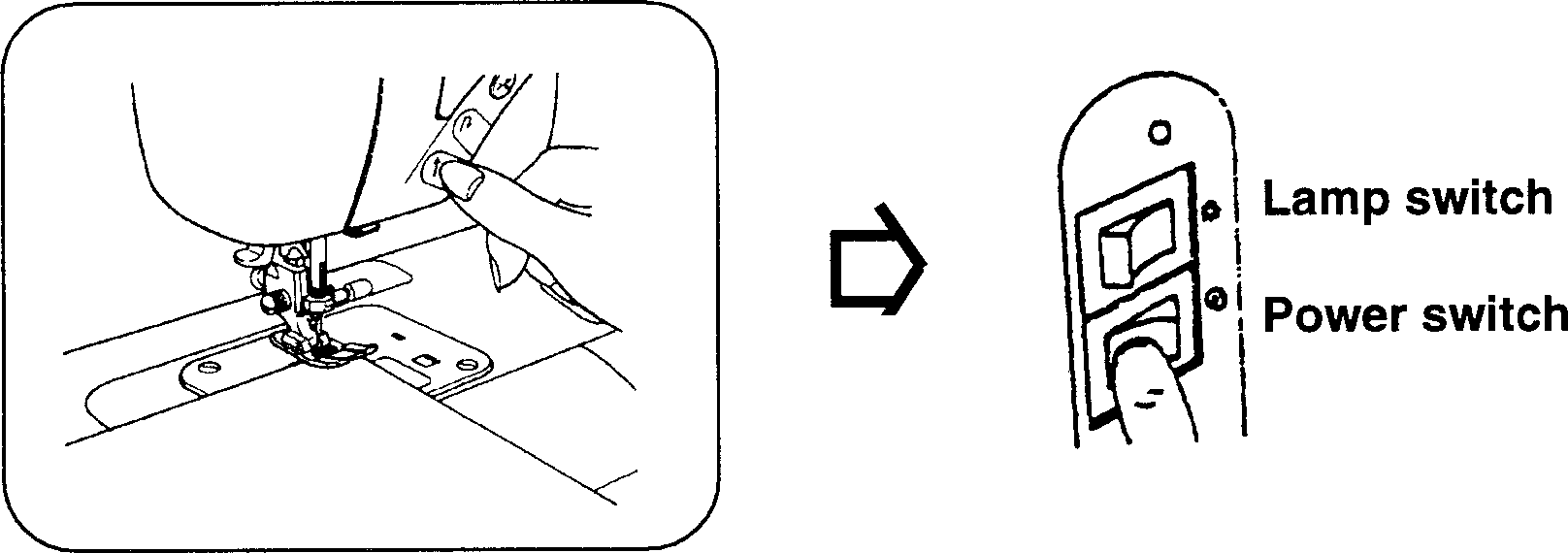
<li>Push the start/stop switch (⬆) and while pressed, turn on the machine, and
release the switch only after the welcome screen has appeared.</li>
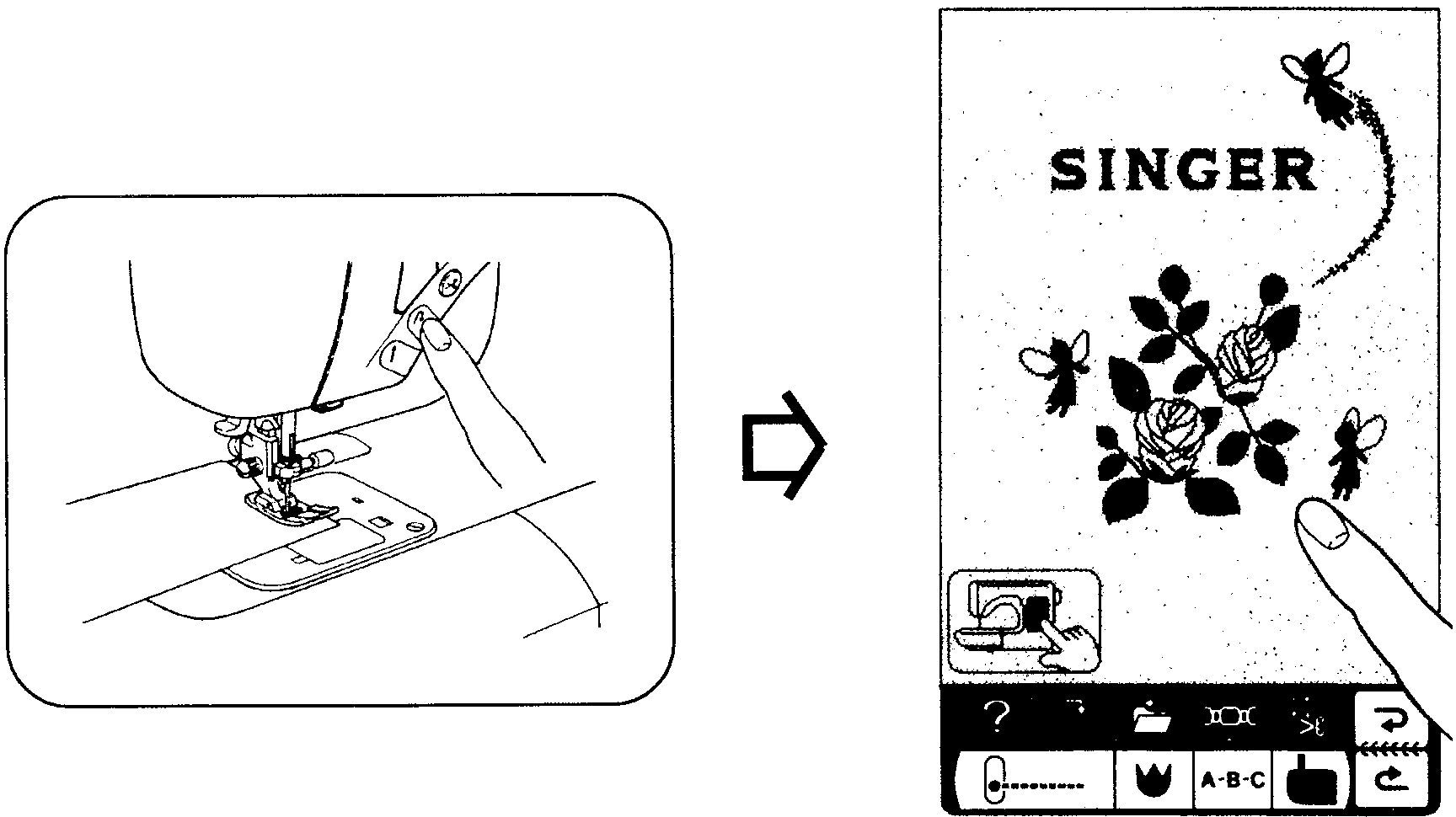
<li>Push the reverse feed stitching switch (↷) and while pressed, touch the
screen and then release the switch.</li>
<li>Now you're in screen calibration mode. A dot appears on the left, touch it
as accurately as you can (for example by using a plastic fork gently).</li>
<li>The dot will reappear on an other spot, repeat the above three times.</li>
<li>After the fourth dot disappears, the screen will look empty. In this mode,
wherever the screen is touched, a pixel appears. It's like a simple drawing
program, but it also makes it possible to test whether the touchscreen works
properly.</li>
<li>Now the important final step: touch the <em>utility</em> button in the lower
left corner of the screen, which saves the calibration data and confirms it
with a beep. After this, the service mode UI apperas with numbers in frames,
but you can just quit by turning the machine off.</li>
<li>Turning the machine on without any button being pressed at the same time
resumes normal operation.</li>
</ol>

<p>Below are two images I cleaned up from the service manual that indicate the
two steps necessary to enter the calibration mode.</p>

<p><img src="https://techblog.vsza.hu/images/singer-xl1000-calibration-step1.png" style="max-width: 100%" alt="First step" title="" /></p>

<p><img src="https://techblog.vsza.hu/images/singer-xl1000-calibration-step2.png" style="max-width: 100%" alt="Second step" title="" /></p>
]]></content>
	</entry>
	<entry>
		<title>Ham radio vs. hacker communities</title>
		<link rel="alternate" type="text/html" href="https://techblog.vsza.hu/posts/Ham_radio_vs._hacker_communities.html"/>
		<updated>2017-12-26T20:12:13+01:00</updated>
      <id>https://techblog.vsza.hu/posts/Ham_radio_vs._hacker_communities.html</id>
      <author><name>dnet</name></author>
		<category term="POSTCATEGORY" scheme="http://www.sixapart.com/ns/types#category"/>
		<content type="html" xml:lang="en" xml:base="https://techblog.vsza.hu"><![CDATA[
      <p>I've spent my last 20 years learning about and playing with stuff that has
electricity in them, and this led me into two communities: the one of hackers,
and the one of ham/amateur radio enthusiasts. Although I managed to get closer
to the latter only in the last 10 years, I found lots of similarities between these
two groups – even though most people I know that belong to only one of these
groups would be surprised at this thought.</p>

<p>The two communities started having a pretty big overlap in the last decades,
especially with the widespread availability of Software Defined Radio (SDR),
most notably <a href="https://www.rtl-sdr.com/about-rtl-sdr/">RTLSDRs</a>, an unintended feature of cheap DVB-T dongles with Realtek
chipsets. This put radio experimentation within reach of hackers and
resulted in unforeseen developments.</p>

<p>In a <a href="https://hackaday.com/2013/09/23/guest-rant-ham-radio-hackers-paradise/">guest rant by Bill Meara</a>, Hack-a-Day already posted a
piece about the two communities being pretty close back in 2013, and there are a
growing number of people like <a href="https://twitter.com/travisgoodspeed">Travis Goodspeed</a> who are pretty active and
successful in both communities. Let's hope that this blog post will encourage
more members of each community to see what the other scene can offer. In the
sections below, I'll try to show how familiar “the other side” can be.</p>

<h4>Subscenes</h4>

<p>There are subsets in both groups defined by skill and/or specific interests
within the scene, which map quite nice between these two groups.</p>

<ul>
<li><p>On the one hand, those who master the craft and gain experience by <strong>making their own tools</strong>
are <strong>held in respect</strong>: real hackers (can) write their own programs, and real
ham radio enthusiasts build their own gear. Even though, in both scenes
this was a big barrier to entry historically, which is getting easier as
time goes by – but this is exactly why those who still experiment with
new methods are usually respected within the community.</p></li>
<li><p>On the other hand, people whose <strong>sole method</strong> of operation is by using
tools made by other people are despised as <em>appliance operators</em> in radio
and <em>script kiddies</em> in hacker terms.</p></li>
<li><p>There are <strong>virtual environments</strong> that mock the real world technology, many
hackers and ham radio operators have mixed feelings towards games like
<a href="https://en.wikipedia.org/wiki/Uplink_(video_game)">Uplink</a> and apps like <a href="http://www.hamsphere.com/">HamSphere</a> respectively. Some
say it helps to spread the word, some question their whole purpose.</p></li>
<li><p><strong>Trolls</strong> can be found in both groups, which can hurt the most when newcomers
meet this subset during their first encounter with the community. A close,
somewhat overlapping group is those who <strong>deliberately cause disruptions</strong> for
others: signal jamming is pretty similar to denial of service (DoS) attacks.
Most members of both communities despise such acts, which is especially
important since the relevant <strong>authorities are often helpless</strong> with such cases.
Of course, this also leads to the eventual forming of lynch mobs for
DoS kiddies and signal jammers alike.</p></li>
<li><p><strong>Mysteries</strong> permeate both scenes, resulting in data collection and analysis.
Ham radio enthusiasts monitor airwaves, while hackers run <em>honeypots</em> to
gather information about what other actors, including governments,
corporations, and people are up to. Campfire talk about such projects
include subjects such as <a href="https://en.wikipedia.org/wiki/Numbers_station">numbers stations</a> and the
<a href="https://en.wikipedia.org/wiki/Equation_Group">Equation Group</a>.</p></li>
<li><p>Although for different reasons, but in both fields, armed with knowledge and
having the right equipment can help a lot in <strong>disaster scenarios</strong>, resulting
in subscenes that deal with such situations, organizing and/or taking part
in <strong>field days</strong> and <strong>exercises</strong>. Of course, both subscenes wouldn't be complete
without the two extremes: people who believe such preparation is unnecessary,
and people who falsely believe they're super important with imaginary
(and sometimes self-made) uniforms, car decorations, reflective vests, etc.</p></li>
<li><p>Some people are fascinated by <strong>artificial limitations</strong>, treating them as
chall&#x65;nges. In the hacker community, various forms of <a href="https://codegolf.stackexchange.com/"><strong>code golf</strong></a>
aim at writing the shortest computer code that performs a specific task,
while ham radio operators experiment with methods to convey a message
between two stations while using a <strong>minimal amount of transmit power</strong>, such as
<a href="http://wsprnet.org/">WSPR</a> or <a href="http://www.qsl.net/on7yd/136narro_old.htm#QRSS">QRSS</a>. Although not strictly part of the hacker
community, <a href="https://www.scene.org/"><strong>demoscene</strong></a> also thrives on such chall&#x65;nges with
demos running on old hardware and intros being limited to a specific amount
of bytes (such as 32, 256, 4k, 64k).</p></li>
<li><p>While artificial limitations may seem competitive in themselves, some people get
almost purely focused on <strong>competitions</strong>. Hackers have their wargames and
<strong>capture the flag</strong> (CTF) events, while ham radio operators have various
forms of <strong>contests</strong>, typically measuring the quantity and quality (such as
distance, rareness) of contacts (QSOs). And in both cases, there are people
who consider competitions the best thing in the hobby, there are those in the
middle, considering it as a great way to improve your skills in a playful way,
and of course, some question the whole purpose and feel that competitions like
these are the reason why we can't have nice things™.</p></li>
<li><p>Both communities have people who prefer <strong>low-level tinkering</strong>. Some hackers
like to jump deep into machine code and/or <strong>assembly</strong>, while some ham radio
operators (especially in the QRP scene) prefer sending and receiving <strong>Morse
code</strong> (CW) transmissions. Also, hackers and amateur radio enthusiasts alike
have quite a few members (re)discovering, fixing and hacking old hardware,
usually for no other obvious reason than “because I can”. In both groups,
outsiders sometimes don't really understand, why anyone would do such
things nowadays, while the real fans ask back “why not”.</p></li>
</ul>

<h4>Other similarities</h4>

<ul>
<li><p><strong>Sharing knowledge</strong> is at the core of both
communities, there are online and AFK meetups where anyone can show what
they did, and newcomers can join the scene. In most places I know, these
groups work <strong>in a meritocratic manner</strong>, focusing more on the technical
content and less on people stuff. And this is important because both
communities deal with things where having a local group of peers can help
individual development a lot.</p></li>
<li><p>Sharing knowledge also means that both communities build a lot on and
publish a lot of <strong>free software</strong> (FLOSS, <em>free</em> as in <em>free speech</em>). Most
hackers nowadays have a GitHub repository with a subset of their projects
published there, while ham radio constructors usually publish schematics
and source code for their firmware, since both communities realize that
remixing and improving other people's designs can lead to awesome results.</p></li>
<li><p>Another common core theme is searching for and overstepping <strong>boundaries and
technical limitations</strong>. Just like shortwave bands given to amateur radio
operators since professionals at the time considered it unusable, people
considered buffer overflows as simply bugs rather than a possible method of
arbitrary code execution. In both fields, tal&#x65;nted members of the respective
communities managed to disprove these statements, leading to technical
development that benefited lots of people, even those outside these groups.</p></li>
<li><p>Both communities are centered around activities that can be done as a <strong>hobby,
but also offer professional career paths</strong>. And in both cases, many
technical developments that are used daily in the professional part of the
scene started out as an experiment in the other, hobbyist part. Also,
becoming a successful member of each community is pretty much orthogonal
with having a college/university degree – that being said, such institutions
can often give home to a small community of either group, examples at
my alma mater include <a href="http://ha5kfu.sch.bme.hu/">HA5KFU</a> and <a href="https://www.crysys.hu/">CrySyS</a>.</p></li>
<li><p>Activities of both groups is a <strong>common plot device in movies</strong>, and because of
limited budgets and screentime, their depiction often lacks detail and
sometimes even a slight resemblance to reality. This results in members of
these communities having another source of fun, as collecting and pointing
out such failures is pretty easy. For example, there are dedicated pages
for collecting movies with characters using <a href="http://www.imrdb.org/">ham radio equipment</a> and
<a href="https://nmap.org/movies/">the popular security scanner Nmap</a> alike.</p></li>
</ul>
]]></content>
	</entry>
	<entry>
		<title>CCCamp 2015 video selection</title>
		<link rel="alternate" type="text/html" href="https://techblog.vsza.hu/posts/CCCamp_2015_video_selection.html"/>
		<updated>2015-08-24T13:57:59+02:00</updated>
      <id>https://techblog.vsza.hu/posts/CCCamp_2015_video_selection.html</id>
      <author><name>dnet</name></author>
		<category term="POSTCATEGORY" scheme="http://www.sixapart.com/ns/types#category"/>
		<content type="html" xml:lang="en" xml:base="https://techblog.vsza.hu"><![CDATA[
      <p>(note: any similarity between this post and the <a href="https://techblog.vsza.hu/posts/CCCamp_2011_video_selection.html">one I made four years ago</a>
is not a coincidence)</p>

<p>The Chaos Communication Camp was even better than four years ago, and for those who were unable to attend (or just enjoyed the fresh air and presence of fellow hackers instead of sitting in the lecture room), the angels recorded and made all the talks available on the <a href="https://media.ccc.de/browse/conferences/camp2015/">camp2015 page of CCC-TV</a>.</p>

<p>I compiled two lists, the first one consists of talks I attended and recommend for viewing in no particular order.</p>

<ul>
<li>Two members of CCC Munich – a hackerspace H.A.C.K. has a really good relationship with – presented <a href="https://media.ccc.de/browse/conferences/camp2015/camp2015-6883-iridium_hacking.html">Iridium Hacking</a>, which showed that they continued the journey they published last December at the Congress. It's really interesting to see what SDRs make possible for hackers, especially knowing that the crew of MuCCC was the one that created <a href="https://rad1o.badge.events.ccc.de/">rad1o</a>, the HackRF-based badge they gave to every attendee.</li>
<li>Speaking of the rad1o, the <a href="https://media.ccc.de/browse/conferences/camp2015/camp2015-6884-the_rad1o.html">talk detailing that awesome piece of hardware</a> was also inspiring and included a surprise appearance of <a href="http://ossmann.blogspot.com/">Michael Ossmann</a>, creator of <a href="http://greatscottgadgets.com/hackrf/">HackRF</a>.</li>
<li>I only watched the <a href="https://media.ccc.de/browse/conferences/camp2015/camp2015-6981-chaos_communication_camp_opening.html">opening</a> and <a href="https://media.ccc.de/browse/conferences/camp2015/camp2015-6982-chaos_communication_camp_closing.html">closing</a> ceremonies from recording, but it was worth it. If you know the feeling of a hacker camp, it has some nice gems (especially the closing one), if you don't, it's a good introduction.</li>
<li>Mitch Altman's talk titled <a href="https://media.ccc.de/browse/conferences/camp2015/camp2015-6842-hackerspace_design_patterns_2_0.html">Hackerspace Design Patterns 2.0</a> also appeals to two distinct audiences; if you already run a hackerspace, it distills some of the experience he gathered while running Noisebridge, if you don't, it encourages to start or join one. It was followed by a pretty good workshop too, but I haven't seen any recording of that yet.</li>
<li>Like many others, my IT background covers way more than my hardware DIY skills, so Lieven's <a href="https://media.ccc.de/browse/conferences/camp2015/camp2015-6688-a_practical_prototyping_primer.html">practical prototyping primer</a> gave me 50 really handy tips so that I can avoid some of the mistakes he made over the last 10 years.</li>
<li>Last but not least, now that analog TV stations are being turned off in many countries, Elektra's talk titled <a href="https://media.ccc.de/browse/conferences/camp2015/camp2015-6738-freifunk_in_tv-whitespace.html">Freifunk in TV-Whitespace</a> shows not only solutions for transverting Wi-Fi signals into the 70 cm band, but also many advantages to motivate hackers doing so.</li>
</ul>

<p>The second list consists of talks I didn't attend but am planning to watch now the camp is over.</p>

<ul>
<li><a href="https://media.ccc.de/browse/conferences/camp2015/camp2015-6907-let_s_encrypt.html">Let's Encrypt – A Certificate Authority To Encrypt the Entire Web</a></li>
<li><a href="https://media.ccc.de/browse/conferences/camp2015/camp2015-6793-a_torifying_tale.html">A Torifying Tale – Our experiences of building and running Tor servers</a></li>
</ul>
]]></content>
	</entry>
	<entry>
		<title>Video manipulation using stdio and FFmpeg</title>
		<link rel="alternate" type="text/html" href="https://techblog.vsza.hu/posts/Video_manipulation_using_stdio_and_FFmpeg.html"/>
		<updated>2015-05-11T12:37:04+02:00</updated>
      <id>https://techblog.vsza.hu/posts/Video_manipulation_using_stdio_and_FFmpeg.html</id>
      <author><name>dnet</name></author>
		<category term="POSTCATEGORY" scheme="http://www.sixapart.com/ns/types#category"/>
		<content type="html" xml:lang="en" xml:base="https://techblog.vsza.hu"><![CDATA[
      <p>Since <a href="https://techblog.vsza.hu/posts/FFmpeg_recipes_for_workshop_videos.html">my FFmpeg recipes post</a> I've been using FFmpeg to process
videos recorded at H.A.C.K. talks and workshops, and I needed an easy
way to inject my own code into the pixel pipeline. For such tasks, I
prefer <a href="https://en.wikipedia.org/wiki/Standard_streams">stdio</a> since there are APIs in every sane programming
language, and the OS solves all the problems regarding the
<a href="https://en.wikipedia.org/wiki/Producer-consumer_problem">producer–consumer problem</a> including parallelization and buffer
management out of the box, while making it simple to tap into streams
and/or replace them with files for debug purposes.</p>

<p>As it turned out, FFmpeg can be used both as a decoder and encoder in
this regard. In case of former, the input is a video file (in my case,
raw DV) and FFmpeg outputs raw RGB triplets, from left to right, then
from top to bottom, advancing from frame to frame. The relevant command
line switches are the following.</p>

<ul>
<li><code>-pix_fmt rgb24</code> sets the pixel format to 24-bit (3 × 8 bit) RGB</li>
<li><code>-vcodec rawvideo</code> sets the video codec to raw, resulting in raw pixels</li>
<li><code>-f rawvideo</code> sets the container format to raw, e.g. no wrapping</li>
<li><code>-</code> (a single dash) as the last parameter sends output to stdout</li>
</ul>

<p>A simple example with 2 frames of 2x2 pixels:</p>

<table>
<tr><th colspan="2">Frame 1</th><th colspan="2">Frame 2</th><th>Raw output (hex dump)</tr>
<tr>
<td style="background: #f00"></td><td style="background: #ff0">
<td style="background: #000"></td><td style="background: #555">
<td rowspan="2"><code><pre>
ff 00 00  ff ff 00   00 ff 00  00 00 ff<br />
00 00 00  55 55 55   aa aa aa  ff ff ff
</pre></code></td>
</tr>
<tr>
<td style="background: #0f0"></td><td style="background: #00f">
<td style="background: #aaa"></td><td style="background: #fff">
</tr>
</table>

<p>The simplest way to test is redirecting the output of a video with solid
colors to <code>hd</code> as it can be seen below (<code>input.mkv</code> is the input file).</p>

<pre><code class="no-highlight">&#x24; ffmpeg -i input.mkv -vcodec rawvideo -pix_fmt rgb24 \
    -f rawvideo - | hd | head
</code></pre>

<p>Such raw image data can be imported in GIMP by selecting <em>Raw image data</em>
in the <em>Select File Type</em> list in the <em>Open</em> dialog; since no metadata is
supplied, every consumer must know at least the width and pixel format of
the image. While GIMP is great for debugging such data, imaging libraries
can also easily read such data, for example PIL offers the <code>Image.frombytes</code>
method that takes the pixel format and the size as a tuple via parameters.</p>

<p>For example <code>Image.frombytes('RGB', (320, 240), binary_data)</code> returns an
<code>Image</code> object if <code>binary_data</code> contains the necessary 320 × 240 × 3 bytes
produced by FFmpeg in <code>rgb24</code> mode. If you only need grayscale, <code>'RGB'</code> can
be replaced with <code>'L'</code> and <code>rgb24</code> with <code>gray</code>, like we did in <a href="https://github.com/hsbp/slide-merger/blob/master/editor.py">our editor</a>.</p>

<p>FFmpeg can also be used as an encoder; in this scenario, the input consists
of raw RGB triplets in the same order as described above, and the output is
a video-only file. The relevant command line switches are the following.</p>

<ul>
<li><code>-r 25</code> defines the number of frames per second (should match the original)</li>
<li><code>-s 320x240</code> defines the size of a frame</li>
<li><code>-f rawvideo -pix_fmt rgb24</code> are the same as above</li>
<li><code>-i -</code> sets stdin as input</li>
</ul>

<p>The simplest way to test is redirecting <code>/dev/urandom</code> which results in
white noise as it can be seen below (4 seconds in the example).</p>

<pre><code class="no-highlight">&#x24; dd if=/dev/urandom bs=$((320 * 240 * 3)) count=100 | ffmpeg -r 25 \
    -s 320x240 -f rawvideo -pix_fmt rgb24 -i - output.mkv
</code></pre>

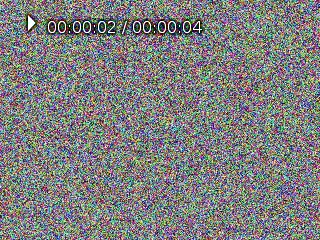
<p>Below is an example of a result played in Mplayer.</p>

<p><img src="https://techblog.vsza.hu/images/mplayer-320x240-whitenoise.png" alt="4 seconds of RGB white noise in Mplayer" title="" /></p>

<p>Having a working encoder and decoder pipeline makes it possible not only to
generate arbitrary output (that's how we <a href="https://github.com/hsbp/havoc.intro">generated our intro</a>) but also
to merge slides with the video recording of the talk. In that case, pixels
can be “forwarded” without modification from the output of the decoder to
the input of the encoder by reading <em>stdin</em> to and writing <em>stdout</em> from the
same buffer, thus creating rectangular shapes of video doesn't even require
image libraries.</p>
]]></content>
	</entry>
	<entry>
		<title>SSTV encoding in Python for fun and profit</title>
		<link rel="alternate" type="text/html" href="https://techblog.vsza.hu/posts/SSTV_encoding_in_Python_for_fun_and_profit.html"/>
		<updated>2013-11-03T20:31:03+01:00</updated>
      <id>https://techblog.vsza.hu/posts/SSTV_encoding_in_Python_for_fun_and_profit.html</id>
      <author><name>dnet</name></author>
		<category term="POSTCATEGORY" scheme="http://www.sixapart.com/ns/types#category"/>
		<content type="html" xml:lang="en" xml:base="https://techblog.vsza.hu"><![CDATA[
      <p>I had been attending the HAM course for a month when I saw <a href="https://en.wikipedia.org/wiki/Slow-scan_television">SSTV</a> for the
first time, and I really liked the idea of transmitting images over low
bandwidth channels. I tried several solutions including <a href="http://users.tel&#x65;net.be/on4qz/qsstv/index.html">QSSTV</a> for
desktop and <a href="http://www.wolphi.com/ham-radio-apps/droidsstv-2">DroidSSTV</a> for mobile usage, but found <a href="http://windytan.github.io/slowrx/">slowrx</a> to be
the best of all, but it was receive-only. I even contributed a <a href="https://github.com/windytan/slowrx/commit/6272e2bd658b10a830ba3b1865105365a4e214fb">patch to
make it usable on machines with more than one sound card</a> (think HDMI),
and started thinking about developing a transmit-only counterpart.</p>

<p>Back in the university days, <a href="http://vmiklos.hu/">vmiklos</a> gave me the idea of implementing
non-trivial tasks in Python (such as solving Sudoku puzzles in Erlang and
Prolog), so I started PySSTV on a day I had time and limited network
connectivity. I relied heavily on the great <a href="http://www.sstv-handbook.com/">SSTV book</a> and testing with
slowrx. For the purposes of latter, I used the <a href="http://www.alsa-project.org/main/index.php/Matrix:Module-aloop">ALSA loopback device</a> that
made it possible to interconnect an application playing sound with another
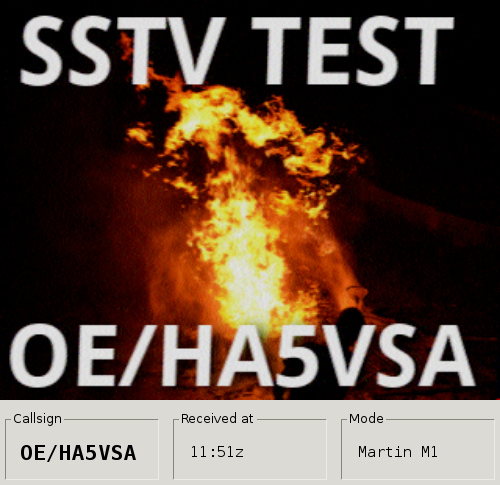
that records it. Below is the result of such a test with event my call sign
sent in FSK being recognized at the bottom. (I used the OE prefix since it
was <a href="https://metalab.at/wiki/Stadtflucht6">Stadtflucht6</a> – thankfully, I could use the <a href="https://metalab.at/wiki/MetaFunk/en">MetaFunk</a> antenna
to test the rig, although as it turned out, Austrians don't use that much
SSTV as no-one replied.)</p>

<p><img src="https://techblog.vsza.hu/images/pysstv-oe-test.jpg" alt="PySSTV test with slowrx in Austria" title="" /></p>

<p>My idea was to create a simple (preferably pure Python) implementation that
helped me understand how SSTV works. Although later I performed optimizations,
the basic design remained the same, as outlined below. The implementation
relies heavily on <a href="https://wiki.python.org/moin/Generators">Python generators</a> so if you're not familiar with things
like the <code>yield</code> statement, I advise you to read into it first.</p>

<h4>Phase 1 of 3: encoding images as an input to the FM modulator</h4>

<p>As SSTV images are effectively modulated using <a href="https://en.wikipedia.org/wiki/Frequency_modulation">FM</a>, the first or innermost
phase reads the input image and produces input to the FM modulator in the form
of frequency-duration pairs. As the standard references milliseconds, <em>duration</em>
is an <code>float</code> in ms, and since SSTV operates on voice frequencies, <em>frequency</em>
is also an <code>float</code> in Hz. As Python provides powerful immutable tuples, I used
them to tie these values together. The <code>gen_freq_bits</code> method of the <code>SSTV</code>
class implements this and generates such tuples when called.</p>

<p><code>SSTV</code> is a generic class located in the <a href="https://github.com/dnet/pySSTV/blob/master/pysstv/sstv.py">sstv</a> module, and provides a
frame for common functionality, such as emitting any headers and trailers. It
calls methods (<code>gen_image_tuples</code>) and reads attributes (<code>VIS_CODE</code>) that can
be overridden / set by descendant classes such as <code>Robot8BW</code> or <code>MartinM1</code>.
Images are read using <a href="http://www.pythonware.com/products/pil/">PIL</a> objects, so the image can be loaded using
simple PIL methods and/or generated/modified using Python code.</p>

<h4>Phase 2 of 3: FM modulation and sampling</h4>

<p>The <code>gen_values</code> method of the <code>SSTV</code> class iterates over the values returned
by <code>gen_freq_bits</code> and implements a simple FM modulator that generates a fixed
sine wave of fixed amplitude. It's also a generator that yields <code>float</code> values
between -1 and +1, the number of those samples per seconds is determined by
the <code>samples_per_sec</code> attribute, usually set upon initialization.</p>

<h4>Phase 3 of 3: quantization</h4>

<p>Although later I found that floats can also be used in WAVE (<code>.wav</code>) files, I
wasn't aware of it earlier, so I implemented a method called <code>gen_samples</code> that
performs quantization by iterating over the output of <code>gen_values</code>, yielding
<code class="cpp">int</code> values this time. I used quantization noise using <a href="https://en.wikipedia.org/wiki/Quantization_(signal_processing)#The_additive_noise_model_for_quantization_error">additive noise</a>,
which introduced a little bit of randomness by the output, which was
compensated in the test suite by using <a href="http://docs.python.org/2/library/unittest.html#unittest.TestCase.assertAlmostEqual">assertAlmostEqual</a> with a <code>delta</code>
value of 1.</p>

<h4>Optimization and examples</h4>

<p>Although it was meant to be a proof of concept, it turned out to be quite usable
on its own. So I started profiling it, and managed to make it run so fast that
now most of the time is taken by the overhead of the generators; it turns out
that every <code>yield</code> means the cost of a function call. For example, I realized
that generating a random value per sample is slow, and the quality of the output
remains the same if I generate 1024 random values and use <a href="http://docs.python.org/2/library/itertools.html#itertools.cycle">itertools.cycle</a>
to repeat them as long as there's input data.</p>

<p>In the end, performance was quite good on my desktop, but resulted in long runs
on Raspberry Pi (more about that later). So I created two simple tools that
made the output of the first two phases above accessible on the standard output.
As I mentioned above, every <code>yield</code> was expensive at this stage of optimization,
and phase 2 and 3 used the largest amount of it (one per pixel vs. one per
sample). On the other hand, these two phases were the simplest ones, so I
reimplemented them using C in <a href="https://github.com/dnet/unixsstv">UNIXSSTV</a>, so <a href="https://github.com/dnet/pySSTV/blob/master/pysstv/examples/get_freq_bits.py">gen_freq_bits.py</a>
can be used to get the best of both worlds.</p>

<p>I also created two examples to show the power of extensibility Python provides
in such few lines of code. The <code>examples</code> module/directory contains scripts for</p>

<ul>
<li>playing audio directly using <a href="http://people.csail.mit.edu/hubert/pyaudio/">PyAudio</a>,</li>
<li>laying a text over the image using PIL calls, and</li>
<li>using <a href="http://en.wikipedia.org/wiki/Inotify">inotify</a> with the <a href="https://github.com/seb-m/pyinotify">pyinotify bindings</a> to implement a simple repeater.</li>
</ul>

<h4>Reception, contribution and real-world usage</h4>

<p>After having a working version, I sent e-mails to some mailing lists and got
quite a few replies. First, some people measured that it took only 240 lines
to implement a few modes, and I was surprised by this. HA5CBM told me about his
idea of putting a small computer and camera into a CCTV case, attaching it to
an UHF radio, transmitting live imagery on a regular basis. I liked the idea
and bought a Raspberry Pi, which can generate a Martin M2 modulated WAVE file
using UNIXSSTV in 30 seconds. Documentation and photos can be found on the
<a href="https://hsbp.org/rpi-sstv">H.A.C.K. project page</a>, source code is available in a <a href="https://github.com/hsbp/rpi-sstv">GitHub repo</a>.</p>

<p>Contribution came from another direction, <a href="http://joel.franusic.com/">Joël Franusic</a> submitted <a href="https://github.com/dnet/pySSTV/pull/1">a pull
request called <em>Minor updates</em></a> which improved some things in the code and
raised my motivation. In the end, he created a dial-a-cat service and posted a
<a href="https://www.twilio.com/blog/2013/10/1-855-meow-jam-sending-cat-pictures-over-the-phone-via-space-age-technology.html">great write-up on the Twilio blog</a>.</p>

<p>If you do something like this, I'd be glad to hear about it, the source code
is available under MIT license in <a href="https://github.com/dnet/pySSTV">my GitHub repository</a> and on <a href="https://pypi.python.org/pypi/PySSTV">PyPI</a>.</p>
]]></content>
	</entry>
	<entry>
		<title>Lighthouse with PWM using ATtiny22</title>
		<link rel="alternate" type="text/html" href="https://techblog.vsza.hu/posts/Lighthouse_with_PWM_using_ATtiny22.html"/>
		<updated>2013-10-18T10:51:13+02:00</updated>
      <id>https://techblog.vsza.hu/posts/Lighthouse_with_PWM_using_ATtiny22.html</id>
      <author><name>dnet</name></author>
		<category term="POSTCATEGORY" scheme="http://www.sixapart.com/ns/types#category"/>
		<content type="html" xml:lang="en" xml:base="https://techblog.vsza.hu"><![CDATA[
      <p><em>October 2013 update: added photos and corrected STK500 pinout</em></p>

<p>After visiting a new hobby craft shop, we decided to create a picture frame
with a seashore theme, which included a lighthouse. I thought it would be nice
to include a pulsating light to make it more realistic - and providing me with
a chall&#x65;nge while <a href="http://mycreativeinspiration.wordpress.com/">Judit</a> did the rest of the frame.</p>

<p>When I got my <a href="http://www.atmel.com/tools/STK500.aspx">Atmel STK500</a>, the guy I bought it from gave some AVR MCUs
with it, so I preferred to use one of these instead of buying one. Based on
size and the number of pins, I selected an <a href="http://www.avrfreaks.net/index.php?module=Freaks%20Devices&amp;func=displayDev&amp;objectid=25">ATtiny22</a>, which could be
used without an external oscillator at 1 MHz, which was more than enough
for me. On the other hand, the ATtiny22 didn't have <a href="https://en.wikipedia.org/wiki/Pulse-width_modulation">PWM</a>, which meant
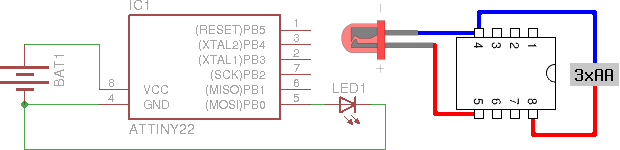
that I had to do it from software. The hardware setup was the following.</p>

<p><img src="https://techblog.vsza.hu/images/lighthouse-schematics.png" alt="Lighthouse controller schematics" title="" /></p>

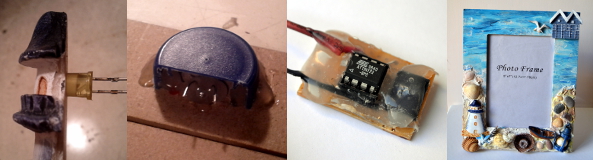
<p>An LED was put through the lighthouse after some drilling, and the pins
were routed through the frame, protected by a plastic bottle cap whose
20% was cut. The controller was put on a board with a socket on the side
for the LED pins, the completely painted final version is on the right.</p>

<p><img src="https://techblog.vsza.hu/images/lighthouse-photos.jpg" alt="Lighthouse frame assembly" title="" /></p>

<p>Since I used PB0 to drive the LED, I defined the bit I had to use as
<code>LED_PIN</code>, with the value 2<sup>0</sup> = 1. I used this first when I set
the direction register (<code>DDR</code>) of port B to use PB0 as output.</p>

<pre><code>DDRB |= LED_PIN;
</code></pre>

<p>The rest of the program is an endless loop that does the pulsating in two
similar phases, increasing the duty cycle of the PWM from minimum to
maximum and then doing the same in reverse.</p>

<pre><code class="cpp">uint8_t level, wait;
while (1) {
    for (level = 0; level &lt; 255; level++) {
        for (wait = 0; wait &lt; HOLD; wait++) {
            sw_pwm(level);
        }
    }
    for (level = 255; level &gt; 0; level--) {
        for (wait = 0; wait &lt; HOLD; wait++) {
            sw_pwm(level);
        }
    }
}
</code></pre>

<p>I defined <code>HOLD</code> to 16 based on experimentation, this value determines how
long the light stays at a specific brightness level, so lowering this
would make the frequency of the pulsating higher. I defined the actual PWM
logic in an inlined function called <code>sw_pwm</code> that executes an amount of
<a href="https://en.wikipedia.org/wiki/NOP">NOP instructions</a> related to the PWM duty cycle and toggles the port
state using the <code>PORTB</code> register.</p>

<pre><code>inline static void sw_pwm(uint8_t fill) {
    uint8_t ctr = 0;
    for (ctr = 0; ctr &lt; fill; ctr++) {
        asm("nop");
    }
    PORTB ^= LED_PIN;
    for (ctr = fill; ctr != 0; ctr++) {
        asm("nop");
    }
    PORTB ^= LED_PIN;
}
</code></pre>

<p>Compilation and conversion to Intel hex was pretty straightforward using GCC.</p>

<pre><code class="no-highlight">&#x24; avr-gcc main.c -o main -O2 -DF_CPU=1000000 -mmcu=attiny22
&#x24; avr-objcopy -j .text -j .data -O ihex main main.hex
</code></pre>

<p>Flashing however required two things to be taken care of.</p>

<ul>
<li><p>AVRdude doesn't know about ATtiny22 by this name, however, the man page
states that “AT90S2323 and ATtiny22 use the same algorithm”, so I used
<code>2343</code> as the parameter to the <code>-p</code> (part) command line switch.</p></li>
<li><p>As <a href="http://www.robotroom.com/Atmel-ATtiny-STK500-Programming.html">David Cook wrote on the Robot Room ATtiny tutorial</a>, using STK500
not only requires putting the ATtiny22 into the rightmost blue socket, but
two additional pins needs to be connected: PB3 to XT1 and PB5 to RST.</p></li>
</ul>

<p>Having done the above, the following command uploads the hex to the ATtiny.</p>

<pre><code class="no-highlight">&#x24; avrdude -p 2343 -c stk500 -P /dev/ttyUSB0 -U flash:w:main.hex
</code></pre>

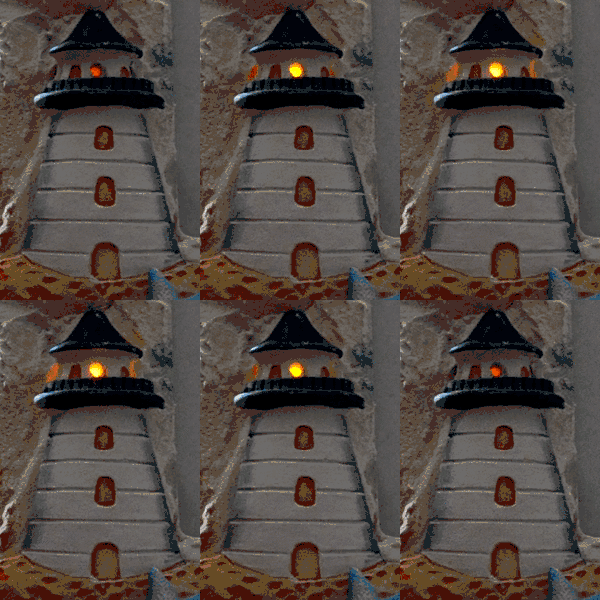
<p>Below is a photo of the completed product, click on the image to view an
animated GIF version, source code is available under MIT license in
<a href="https://github.com/dnet/lighthouse-attiny-softpwm">my GitHub repository</a>.</p>

<p><a href="https://techblog.vsza.hu/images/lighthouse.gif" target="_blank" id="lighthousegif">
<img src="https://techblog.vsza.hu/images/lighthouse.png" alt="The completed lighthouse, click to play" title="" />
</a></p>

<script type="text/javascript">
var anchor = document.getElementById("lighthousegif");
anchor.onclick = function(evt) {
    anchor.getElementsByTagName("IMG")[0].src = anchor.href;
    return false;
}
</script>
]]></content>
	</entry>
	<entry>
		<title>SSH-SMTP as an SMTPS replacement</title>
		<link rel="alternate" type="text/html" href="https://techblog.vsza.hu/posts/SSH-SMTP_as_an_SMTPS_replacement.html"/>
		<updated>2013-07-18T19:30:19+02:00</updated>
      <id>https://techblog.vsza.hu/posts/SSH-SMTP_as_an_SMTPS_replacement.html</id>
      <author><name>dnet</name></author>
		<category term="POSTCATEGORY" scheme="http://www.sixapart.com/ns/types#category"/>
		<content type="html" xml:lang="en" xml:base="https://techblog.vsza.hu"><![CDATA[
      <p><a href="https://techblog.vsza.hu/posts/Four_free_software_I_started_using_in_2012.html">In February 2013, I wrote</a> about replacing SMTPS (SMTP + SSL/TLS) with a
local MTA, and this week, I finally managed to create a solution of my own.
It's called SSH-SMTP, and it's <a href="https://github.com/dnet/ssh-smtp">available in my GitHub repository</a> under
MIT license. It should compile at least on Linux, Mac, and Windows, and any
other OS that supports Qt. I chose C++ and Qt because it's been a while since
I did anything in C++ and Qt offers a powerful signaling solution that could
be used in this scenario.</p>

<p>The core idea was to accept SMTP connections, extract the sender from the
<code>MAIL FROM</code> command, and proxy the connection to the appropriate SMTP server
over SSH. I <a href="https://github.com/dnet/ssh-smtp/commit/8ac29120a05891003b2a5c5a98d8b8c0e2a13562">started</a> with <a href="http://www.qtforum.org/article/26552/socket-communication-with-tcp-client-server-sample-code.html">a QTcpServer example on Qtforum.org</a>, and
added a <a href="http://qt-project.org/doc/qt-5.0/qtcore/qprocess.html">QProcess</a> to handle the SSH connection.</p>

<p>When a new client connects, the <code>newConnection</code> signal of <code>QTcpServer</code> is
fired, and the proxy sends a standard SMTP greeting. When data arrives from
the MUA, the <code>readyRead</code> signal of <code>QTcpSocket</code> is fired, and at first, the
proxy looks for <code>HELO</code>, <code>EHLO</code> and <code>MAIL FROM</code> commands. The first two are
answered by a simple reply, while latter is used to determine the sender.
Although <a href="http://blog.rburchell.com/2011/12/why-i-avoid-qregexp-in-qt-4-and-so.html">some say that QRegExp is slow</a>, I used it since it's used only
once per connection, and it fits better into Qt code (for example, it uses
QStrings parameters and return values).</p>

<p>The extracted value is used as a lookup value, and I chose <a href="http://qt-project.org/doc/qt-5.0/qtcore/qsettings.html">QSettings</a> to
store it, as it's pretty easy to use, and abstracts away OS-specific ways of
persistence (for example, it uses text files on Unix-like systems, and
Registry on Windows). If a valid mapping is found, the appropriate SSH
command is invoked, connecting to the remote server. By default, <code>ssh</code> and
<code>nc</code> is used, but these can be overridden using QSettings as well.</p>

<p>After the connection to the remote SMTP server over SSH has opened, all
traffic previously received from the MUA is transmitted to get the two parties
sychronized. This also means that the replies to these commands must not be
transmitted to the MUA, so the SMTP to MUA forwarder waits for the first
line that starts with <code>"250 "</code> (250 and a space) and only passes on traffic
received after this line to the MUA.</p>

<p>After this is done, the proxy waits for either the TCP socket or the SSH
process output to become readable, and passes data on to the other party.
Also, if either one of them closes, the other one is closed as well. I've been
using it for two days in production without any problems, and it finally
solved both the authentication and the confidentiality problem, as I already
have public key-based authentication set up on my SMTP servers, and SSH
uses <a href="https://en.wikipedia.org/wiki/Diffie%E2%80%93Hellman_key_exchange">Diffie–Hellman key exchange</a> by default, so I don't have to spend
time configuring the TLS listener to implement <a href="https://en.wikipedia.org/wiki/Perfect_forward_secrecy">PFS</a>. Also ,sending e-mails
have become significantly faster for me, as I use <a href="https://en.wikibooks.org/wiki/OpenSSH/Cookbook/Multiplexing">SSH multiplexing</a>,
so sending a new e-mail doesn't require building a new TCP connection and
a TLS session above it, followed by password authentication. And as a bonus,
headers in my outgoing e-mail won't contain the IP address of my notebook.</p>
]]></content>
	</entry>
	<entry>
		<title>Using TOR to evade Play Store geoban</title>
		<link rel="alternate" type="text/html" href="https://techblog.vsza.hu/posts/Using_TOR_to_evade_Play_Store_geoban.html"/>
		<updated>2013-06-13T17:19:16+02:00</updated>
      <id>https://techblog.vsza.hu/posts/Using_TOR_to_evade_Play_Store_geoban.html</id>
      <author><name>dnet</name></author>
		<category term="POSTCATEGORY" scheme="http://www.sixapart.com/ns/types#category"/>
		<content type="html" xml:lang="en" xml:base="https://techblog.vsza.hu"><![CDATA[
      <p>At Sil&#x65;nt Signal, we use Amazon Web Services for various purposes (no, we don't
run code that handles sensitive information or store such material without
end-to-end encryption in the cloud), and when I read that <a href="http://aws.amazon.com/mfa/">multi factor
authentication is available for console login</a>, I wanted to try it. Amazon
even had <a href="http://aws.amazon.com/mfa/">an app called AWS virtual MFA</a> in the Play Store and
<a href="https://play.google.com/store/apps/details?id=com.amazonaws.mobile.apps.Authenticator">in their appstore</a>, but I couldn't find them on my Nexus S, so I tried
a different approach by opening a direct link. The following message confirmed
that I couldn't find it beacuse someone found it a good idea to geoban this
application, so it wasn't available in Hungary.</p>

<p><img src="https://techblog.vsza.hu/images/aws-mfa-geoban.png" alt="Geoban in Play Store on AWS virtual MFA" title="" /></p>

<p>Although a month ago I found a way to <a href="https://techblog.vsza.hu/posts/Using_Android_emulator_with_Burp_Suite.html">use Burp with the Android emulator</a>,
but this time, I didn't want to do a man-in-the-middle attack, but rather just
redirect all traffic through an Internet connection in a country outside the
geoban. I chose the United States, and configured <a href="https://www.torproject.org/">TOR</a> to select an exit node
operating there by appending the <a href="http://www.2byts.com/2012/03/09/how-to-configure-the-exit-country-on-tor-network/">following two lines</a> to <code>torrc</code>.</p>

<pre><code>ExitNodes {us}
StrictExitNodes 1
</code></pre>

<p>TOR was listening on port 9050 as a SOCKS proxy, but Android needs an HTTP one,
so I installed <a href="http://www.privoxy.org/">Privoxy</a> using <code>apt-get install privoxy</code>, and just
uncommented a line in the Debian default configuration file
<code>/etc/privoxy/config</code> that enabled TOR as an upstream proxy.</p>

<pre><code>forward-socks5   /               127.0.0.1:9050 .
</code></pre>

<p>For some reason, the Android emulator didn't like setting Privoxy as the HTTP
proxy – HTTP connections worked, but in case of HTTPS ones, the emulator just
closed the connection with a FIN just after receiving the SSL Server Hello
packet, as it can be seen below in the output of Wireshark.</p>

<p><img src="https://techblog.vsza.hu/images/server-hello-fin-617.png" alt="Android emulator sending a FIN right after SSL Server Hello" title="" /></p>

<p>Even disconnecting TOR from Privoxy didn't help, so after 30 minutes of trials,
I found another way to set a proxy in the Android emulator – or any device for
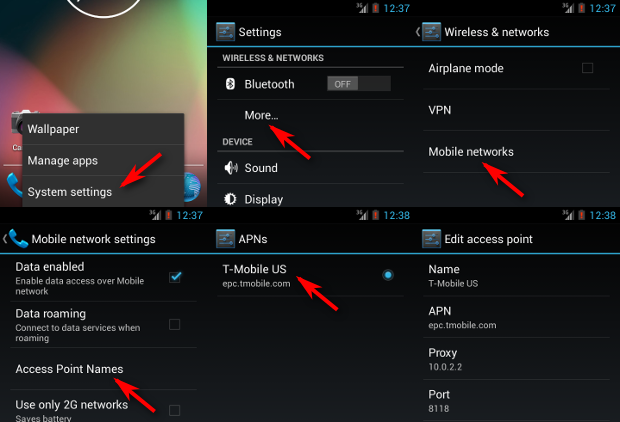
that matter. The six steps are illustrated on the screenshots below, and the
essence is that the emulator presents the network as an Access Point, and such
APs can have a proxy associated with them. The QEMU NAT used by the Android
emulator makes the host OS accessible on 10.0.2.2, so setting this up with
the default Privoxy port 8118 worked for the first try.</p>

<p><img src="https://techblog.vsza.hu/images/android-proxy-6pack.png" alt="Setting up an Access Point proxy in Android" title="" /></p>

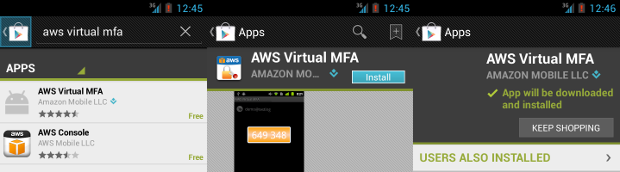
<p>I installed Play Store by following <a href="http://stackoverflow.com/a/11213598/246098">a Stack Overflow answer</a>, and as it can
be seen below, it appeared in the search results and I was able to install it –
although the process was pretty slow, and some images are missing from the
screenshots below because the latency of TOR was so high that I didn't wait for
them to be loaded.</p>

<p><img src="https://techblog.vsza.hu/images/aws-mfa-install.png" alt="Installing AWS virtual MFA from Play Store over TOR" title="" /></p>

<p>Having the app installed on the emulator, it's trivial to get the APK file that
can be installed on any device now, even those without network connection.</p>

<pre><code class="no-highlight">&#x24; adb pull /data/app/com.amazonaws.mobile.apps.Authenticator-1.apk .
837 KB/s (111962 bytes in 0.130s)
&#x24; file com.amazonaws.mobile.apps.Authenticator-1.apk
com.amazonaws.mobile.apps.Authenticator-1.apk: Zip archive data, at least v2.0 to extract
&#x24; ls -l com.amazonaws.mobile.apps.Authenticator-1.apk
-rw-r--r-- 1 dnet dnet 111962 jún   13 14:49 com.amazonaws.mobile.apps.Authenticator-1.apk
</code></pre>
]]></content>
	</entry>
	<entry>
		<title>Testing OAuth APIs with Burp Suite</title>
		<link rel="alternate" type="text/html" href="https://techblog.vsza.hu/posts/Testing_OAuth_APIs_with_Burp_Suite.html"/>
		<updated>2013-06-12T20:24:54+02:00</updated>
      <id>https://techblog.vsza.hu/posts/Testing_OAuth_APIs_with_Burp_Suite.html</id>
      <author><name>dnet</name></author>
		<category term="POSTCATEGORY" scheme="http://www.sixapart.com/ns/types#category"/>
		<content type="html" xml:lang="en" xml:base="https://techblog.vsza.hu"><![CDATA[
      <p>Two months ago I tried testing a REST API that used <a href="http://tools.ietf.org/html/rfc5849">OAuth 1.0</a> for
authentication and I prefer to use <a href="http://portswigger.net/burp/">Burp Suite</a> for such tasks. My only
problem was that OAuth 1.0 requires signing each request with a different
<a href="https://en.wikipedia.org/wiki/Cryptographic_nonce">nonce</a>, so using the built-in scanner of Burp would've been impossible
without Burp learning how to do it.</p>

<p>I tried solving the problem by setting an <a href="https://github.com/mojodna/oauth-proxy">oauth-proxy</a> as an upstream
proxy in Burp, and I even <a href="https://github.com/mojodna/oauth-proxy/pull/3">sent a patch to make it work with Burp</a>, but
I had some problems with it, and since I wanted to try <a href="http://portswigger.net/burp/extender/">Burp Extender</a>
since the day it was announced, I decided to write a Burp plugin. Although
it's possible to write such plugins in Python and Ruby as well, I found that
they required Jython and JRuby, which I consider worst of both worlds, so in
the end, I did it using Java, the lesser of two (three) evils.</p>

<p>I searched the web for sensible Java OAuth implementations, and chose
<a href="http://code.google.com/p/oauth-signpost/">Signpost</a> since it had a pretty straightforward API and depended only on
the <a href="http://commons.apache.org/proper/commons-codec/">Apache Commons Codec</a> library. To meet the deadlines, I hand-crafted
the HTTP parsing and generator class called <code>BurpHttpRequestWrapper</code> that
wraps an object that implements the <code>IHttpRequestResponse</code> interface of Burp,
and itself implements the <code>HttpRequest</code> interface that Signpost uses to
read and manipulate HTTP requests. I also created a simple test suite using
JUnit 4 that makes sure that my code doesn't break HTTP requests in any
unexpected ways. Later I found out about the <a href="http://portswigger.net/burp/extender/api/burp/IRequestInfo.html">IRequestInfo</a> interface
that would've made it possible to use the internals of Burp to do at least
the parsing part, so I started a <a href="https://github.com/dnet/burp-oauth/tree/IRequestInfo">branch with a matching name</a> to do
experimentation, although as of 12<sup>th</sup> June 2013, it doesn't work.</p>

<p>The working version can be found in <a href="https://github.com/dnet/burp-oauth">my GitHub repo</a>, the instructions
for building and configuring can be found in the README. Below is an example
demonstrating the <a href="https://dev.twitter.com/docs/api/1.1/get/account/verify_credentials">verify_credentials method of the Twitter API 1.1</a> using
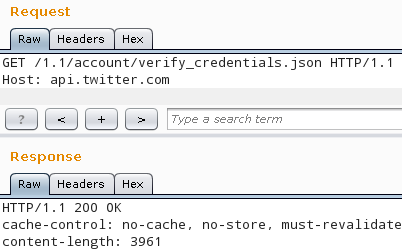
the <a href="http://portswigger.net/burp/repeater.html">repeater module of Burp</a>. Although the request at the top doesn't have
an <code>Authorization</code> header, Twitter responded with <code>200 OK</code>, so the plugin
inserted the appropriate headers correctly. The actual header can be seen if
the logging of HTTP requests is enabled in the <code>Options</code> > <code>Misc</code> tab.</p>

<p><img src="https://techblog.vsza.hu/images/burp-twitter.png" alt="Burp Suite Repeater requests Twitter API" title="" /></p>

<pre><code>======================================================
19:52:27  https://api.twitter.com:443  [199.16.156.40]
======================================================
GET /1.1/account/verify_credentials.json HTTP/1.1
Host: api.twitter.com
Authorization: OAuth oauth_consumer_key="xxx",
    oauth_nonce="-181747806056868046",
    oauth_signature="QZDwnam9I%2FrCdXzj4l3mnPSgRlY%3D",
    oauth_signature_method="HMAC-SHA1",
    oauth_timestamp="1371059545",
    oauth_token="xxx", oauth_version="1.0"
</code></pre>
]]></content>
	</entry>
	<entry>
		<title>F33dme vs. Django 1.4 HOWTO</title>
		<link rel="alternate" type="text/html" href="https://techblog.vsza.hu/posts/F33dme_vs._Django_1.4_HOWTO.html"/>
		<updated>2013-05-31T14:17:04+02:00</updated>
      <id>https://techblog.vsza.hu/posts/F33dme_vs._Django_1.4_HOWTO.html</id>
      <author><name>dnet</name></author>
		<category term="POSTCATEGORY" scheme="http://www.sixapart.com/ns/types#category"/>
		<content type="html" xml:lang="en" xml:base="https://techblog.vsza.hu"><![CDATA[
      <p>Although <a href="https://github.com/asciimoo">asciimoo</a> unofficially abandoned it for <a href="https://github.com/asciimoo/potion">potion</a>, I've been
using <a href="https://github.com/asciimoo/f33dme">f33dme</a> with <a href="https://github.com/dnet/f33dme">slight modifications</a> as a feed reader since May
2011. On 4<sup>th</sup> May 2013, <a href="https://github.com/dnet/f33dme">Debian released Wheezy</a>, so when I
upgraded the server I ran my f33dme instance on, I got <a href="https://www.djangoproject.com/">Django</a> 1.4 along
with it. As with major upgrades, nothing worked after the upgrade, so I had
to tweak the code to make it work with the new release of the framework.</p>

<p>First of all, the database configuration in <code>settings.py</code> were just simple
key-value pairs like <code>DATABASE_ENGINE = 'sqlite3'</code>, these had to be replaced
with a more structured block like the one below.</p>

<pre><code class="python">DATABASES = {
    'default': {
        'ENGINE': 'sqlite3',
        ...
    }
}
</code></pre>

<p>Then starting the service using <code>manage.py</code> displayed the following error
message.</p>

<pre><code class="no-highlight">Error: One or more models did not validate:
admin.logentry: 'user' has a relation with model
    &lt;class 'django.contrib.auth.models.User'&gt;, which
    has either not been installed or is abstract.
</code></pre>

<p><a href="http://stackoverflow.com/a/13209045">Abdul Rafi wrote on Stack Overflow</a> that such issues could be solved by
adding <code>django.contrib.auth</code> to <code>INSTALLED_APPS</code>, and in case of f33dme, it
was already there, <a href="https://github.com/dnet/f33dme/commit/ef67410">I just had to uncomment it</a>. After this modification,
<code>manage.py</code> started without problems, but rendering the page resulted in the
error message below.</p>

<pre><code class="no-highlight">ImproperlyConfigured: Error importing template source loader
    django.template.loaders.filesystem.load_template_source: "'module'
    object has no attribute 'load_template_source'"
</code></pre>

<p>Searching the web for the text above led me to <a href="http://stackoverflow.com/q/11904609">another Stack Overflow
question</a>, and <a href="https://github.com/dnet/f33dme/commit/788153c">correcting the template loaders section in settings.py</a>
solved the issue. Although it's not a strictly Django-related problem, but
another component called <a href="https://code.google.com/p/feedparser/">feedparser</a> also got upgraded and started
returning such values that resulted in <code>TypeError</code> exceptions, so the
handler in fetch.py <a href="https://github.com/dnet/f33dme/commit/03cdb16">also had to be extended</a> to deal with such cases.</p>

<p>With the modifications described above, f33dme now works like a charm,
although deprecation warnings still get written to the logs both from
Django and feedparser, but these can be dealt with till the next Debian
upgrade, and until then, I have a working feed reader.</p>
]]></content>
	</entry>
	<entry>
		<title>Bootstrapping the CDC version of Proxmark3</title>
		<link rel="alternate" type="text/html" href="https://techblog.vsza.hu/posts/Bootstrapping_the_CDC_version_of_Proxmark3.html"/>
		<updated>2013-05-15T16:50:01+02:00</updated>
      <id>https://techblog.vsza.hu/posts/Bootstrapping_the_CDC_version_of_Proxmark3.html</id>
      <author><name>dnet</name></author>
		<category term="POSTCATEGORY" scheme="http://www.sixapart.com/ns/types#category"/>
		<content type="html" xml:lang="en" xml:base="https://techblog.vsza.hu"><![CDATA[
      <p>A few weeks ago I updated my working directory of <a href="https://code.google.com/p/proxmark3/">Proxmark3</a> and found
that <a href="http://www.cs.ru.nl/~rverdult/">Roel Verdult</a> finally improved the USB stack by ditching the old
HID-based one and using <a href="https://en.wikipedia.org/wiki/USB_communications_device_class">USB CDC</a>. My only problem was that having a device
running the HID bootloader and a compiled version of the CDC flasher caused a
chicken-egg problem. I only realized it when running <code>make flash-all</code> resulted
in the following error message.</p>

<pre><code class="no-highlight">client/flasher -b bootrom/obj/bootrom.elf armsrc/obj/osimage.elf armsrc/obj/fpgaimage.elf
Loading ELF file 'bootrom/obj/bootrom.elf'...
Loading usable ELF segments:
0: V 0x00100000 P 0x00100000 (0x00000200-&gt;0x00000200) [R X] @0x94
1: V 0x00200000 P 0x00100200 (0x00000e1c-&gt;0x00000e1c) [RWX] @0x298
Attempted to write bootloader but bootloader writes are not enabled
Error while loading bootrom/obj/bootrom.elf
</code></pre>

<p>I checked the <code>flasher</code> and found that it didn't recognize the <code>-b</code> command
line switch because it expected a port name (like <code>/dev/ttyACM0</code>) as the first
argument. So I needed an old <code>flasher</code>, but first, I checked if the <code>flasher</code>
binary depended on any Proxmark3 shared object libraries.</p>

<pre><code class="no-highlight">&#x24; ldd client/flasher
    linux-vdso.so.1 =&gt;  (0x00007fff6a5df000)
    libreadline.so.6 =&gt; /lib/x86_64-linux-gnu/libreadline.so.6 (0x00007fb1476d9000)
    libpthread.so.0 =&gt; /lib/x86_64-linux-gnu/libpthread.so.0 (0x00007fb1474bd000)
    libstdc++.so.6 =&gt; /usr/lib/x86_64-linux-gnu/libstdc++.so.6 (0x00007fb1471b5000)
    libm.so.6 =&gt; /lib/x86_64-linux-gnu/libm.so.6 (0x00007fb146f33000)
    libgcc_s.so.1 =&gt; /lib/x86_64-linux-gnu/libgcc_s.so.1 (0x00007fb146d1d000)
    libc.so.6 =&gt; /lib/x86_64-linux-gnu/libc.so.6 (0x00007fb146992000)
    libtinfo.so.5 =&gt; /lib/x86_64-linux-gnu/libtinfo.so.5 (0x00007fb146769000)
    /lib64/ld-linux-x86-64.so.2 (0x00007fb147947000)
</code></pre>

<p>Since the above were all system libraries, I used an old <code>flasher</code> left behind
from the ages before I had commit access to the Proxmark3 SVN repository.</p>

<pre><code class="no-highlight">&#x24; /path/to/old/flasher -b bootrom/obj/bootrom.elf \
    armsrc/obj/osimage.elf armsrc/obj/fpgaimage.elf
Loading ELF file 'bootrom/obj/bootrom.elf'...
Loading usable ELF segments:
0: V 0x00100000 P 0x00100000 (0x00000200-&gt;0x00000200) [R X] @0x94
1: V 0x00200000 P 0x00100200 (0x00000e1c-&gt;0x00000e1c) [RWX] @0x298

Loading ELF file 'armsrc/obj/osimage.elf'...
Loading usable ELF segments:
1: V 0x00110000 P 0x00110000 (0x00013637-&gt;0x00013637) [R X] @0xb8
2: V 0x00200000 P 0x00123637 (0x00002c74-&gt;0x00002c74) [RWX] @0x136f0
Note: Extending previous segment from 0x13637 to 0x162ab bytes

Loading ELF file 'armsrc/obj/fpgaimage.elf'...
Loading usable ELF segments:
0: V 0x00102000 P 0x00102000 (0x0000a4bc-&gt;0x0000a4bc) [R  ] @0xb4

Waiting for Proxmark to appear on USB...
Connected units:
        1. SN: ChangeMe [002/007]
 Found.
Entering bootloader...
(Press and release the button only to abort)
Waiting for Proxmark to reappear on USB....
Connected units:
        1. SN: ChangeMe [002/008]
 Found.

Flashing...
Writing segments for file: bootrom/obj/bootrom.elf
 0x00100000..0x001001ff [0x200 / 2 blocks].. OK
 0x00100200..0x0010101b [0xe1c / 15 blocks]............... OK

Writing segments for file: armsrc/obj/osimage.elf
 0x00110000..0x001262aa [0x162ab / 355 blocks]................................................................................................................................................................................................................................................................................................................................................................... OK

Writing segments for file: armsrc/obj/fpgaimage.elf
 0x00102000..0x0010c4bb [0xa4bc / 165 blocks]..................................................................................................................................................................... OK

Resetting hardware...
All done.

Have a nice day!
</code></pre>

<p>After resetting the Proxmark3, it finally got recognized by the system as a CDC
device, as it can be seen below on a <code>dmesg</code> snippet.</p>

<pre><code class="no-highlight">[10416.461687] usb 2-1.2: new full-speed USB device number 12 using ehci_hcd
[10416.555093] usb 2-1.2: New USB device found, idVendor=2d2d, idProduct=504d
[10416.555105] usb 2-1.2: New USB device strings: Mfr=1, Product=0, SerialNumber=0
[10416.555111] usb 2-1.2: Manufacturer: proxmark.org
[10416.555814] cdc_acm 2-1.2:1.0: This device cannot do calls on its own. It is not a modem.
[10416.555871] cdc_acm 2-1.2:1.0: ttyACM0: USB ACM device
</code></pre>

<p>The only change I saw at first was that the client became more responsive and
it required the port name as a command line argument.</p>

<pre><code class="no-highlight">&#x24; ./proxmark3 /dev/ttyACM0
proxmark3&gt; hw version
#db# Prox/RFID mark3 RFID instrument                 
#db# bootrom: svn 699 2013-04-24 11:00:32                 
#db# os: svn 702 2013-04-24 11:02:43                 
#db# FPGA image built on 2012/ 1/ 6 at 15:27:56
</code></pre>

<p>Being happy as I was after having a working new CDC-based version, I started
using it for the task I had in mind, but unfortunately, I managed to find a bug
just by reading a block from a Mifare Classic card. It returned all zeros for
all blocks, even though I knew they had non-zero bytes. I found the bug that
was introduced by porting the code from HID to CDC and <a href="https://code.google.com/p/proxmark3/source/detail?r=702">committed my fix</a>,
but I recommend everyone to test your favorite functionality thoroughly to
ensure that changing the USB stack doesn't affect functionality in a negative
way. If you don't have commit access, drop me an e-mail with a patch or open
an issue on the <a href="https://code.google.com/p/proxmark3/issues/list">tracker of the project</a>.</p>

<p>Happy RFID hacking!</p>
]]></content>
	</entry>
	<entry>
		<title>Bootstrapping MySQL for testing</title>
		<link rel="alternate" type="text/html" href="https://techblog.vsza.hu/posts/Bootstrapping_MySQL_for_testing.html"/>
		<updated>2013-05-06T19:42:24+02:00</updated>
      <id>https://techblog.vsza.hu/posts/Bootstrapping_MySQL_for_testing.html</id>
      <author><name>dnet</name></author>
		<category term="POSTCATEGORY" scheme="http://www.sixapart.com/ns/types#category"/>
		<content type="html" xml:lang="en" xml:base="https://techblog.vsza.hu"><![CDATA[
      <p>When I created <a href="https://github.com/dnet/registr">registr</a>, I wanted a way to test it on the same RDBMS as the
one I use for <a href="http://www.redmine.org/">Redmine</a>, MySQL. For the purposes of testing, I wanted to
start a fresh instance of <code>mysqld</code> that could be ran without superuser
privileges, without affecting other running MySQL instances, and with
minimal resource consumtion.</p>

<p>Although the test suite was developed in Python, the idea can be used with any
language that makes it possible to create temporary directories in a manner
that avoids race conditions and spawn processes. The code can be found in the
<a href="https://github.com/dnet/registr/blob/mysql/test_redmine.py">TestRedmineMySQL class</a>, and it follows the steps described below.</p>

<ul>
<li>Create a temporary directory (<code>path</code>)</li>
<li>Create a directory inside <code>path</code> (<code>datadir</code>)</li>
<li>Generate two fil&#x65;names inside <code>path</code> (<code>socket</code> and <code>pidfile</code>)</li>
<li>Spawn the <code>mysqld_safe</code> binary with the following parameters.
<ul>
<li><code>--socket=</code> and the value of <code>socket</code> makes MySQL accept connections throught that file</li>
<li><code>--datadir=</code> and the value of <code>datadir</code> makes MySQL store all databases in that directory</li>
<li><code>--skip-networking</code> disables the TCP listener, thus minimizes interference with other instances</li>
<li><code>--skip_grant_tables</code> disables access control, since we don't need that for testing</li>
<li><code>--pid-file=</code> and the value of <code>pidfile</code> makes MySQL store the process ID in that file</li>
</ul></li>
<li>Do what you want with the database</li>
<li>Open the file named <code>pidfile</code> and read an integer from the only row</li>
<li>Send a <code>SIGTERM</code> to the PID</li>
<li>Wait for the process to finish.</li>
</ul>

<p>The above way worked fine for me, didn't leave any garbage on the system, and
ran as fast as an Oracle product could do. :)</p>
]]></content>
	</entry>
	<entry>
		<title>Using Android emulator with Burp Suite</title>
		<link rel="alternate" type="text/html" href="https://techblog.vsza.hu/posts/Using_Android_emulator_with_Burp_Suite.html"/>
		<updated>2013-05-02T17:34:15+02:00</updated>
      <id>https://techblog.vsza.hu/posts/Using_Android_emulator_with_Burp_Suite.html</id>
      <author><name>dnet</name></author>
		<category term="POSTCATEGORY" scheme="http://www.sixapart.com/ns/types#category"/>
		<content type="html" xml:lang="en" xml:base="https://techblog.vsza.hu"><![CDATA[
      <p>I still find <a href="http://portswigger.net/burp/">Burp Suite</a> the best tool for web-related penetration testing,
and assessing Android applications are no exception. In the past, I used my
phone with iptables, but lately – especially since the emulator <a href="http://developer.android.com/tools/devices/emulator.html#accel-graphics">supports
using the host OpenGL for graphics</a> – I started to prefer the emulator.</p>

<p>First of all, setting an emulator-wide proxy is really easy, as <a href="http://fas.mide.dk/2011/11/make-android-emulator-ready-for-ssl.html">Fas wrote</a>,
all I needed was the <code>-http-proxy</code> command line argument. Because of this, I
had to start the emulator from command line – I've only used the GUI provided
by <code>android</code> before. I looked at the output of <code>ps w</code> for hints, and at first,
I used a command line like the following.</p>

<pre><code class="no-highlight">&#x24; tools/emulator64-arm -avd Android17 -http-proxy http://127.0.0.1:8081
emulator: ERROR: Could not load OpenGLES emulation library: lib64OpenglRender.so: cannot open shared object file: No such file or directory
emulator: WARNING: Could not initialize OpenglES emulation, using software renderer.
</code></pre>

<p>Since using the Android emulator without hardware rendering would've been like
using Subversion after Git, I looked into the matter and found that I just had
to set the <code>LD_LIBRARY_PATH</code> path to the <code>tools/lib</code> subdirectory of the SDK.
Now I could intercept various TCP connections using Burp, but in case of SSL
connections, certificate mismatch caused the usual problem.</p>

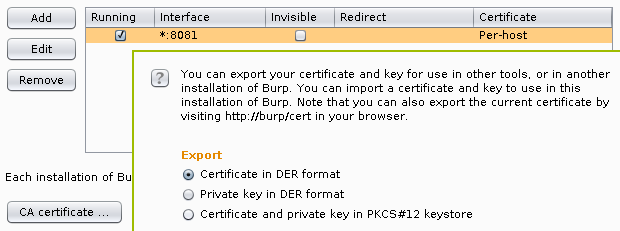
<p>Luckily, Burp provides really easy ways of exporting the its root CA
certificate in the last few releases, I chose to export it into a DER file by
clicking on the <code>Certificate</code> button on the <code>Options</code> subtab of the <code>Proxy</code>
tab, and selecting the appropriate radio button as seen below.</p>

<p><img src="https://techblog.vsza.hu/images/burp-root-ca-cert-export.png" alt="Exporting root CA certificate from Burp Proxy" title="" /></p>

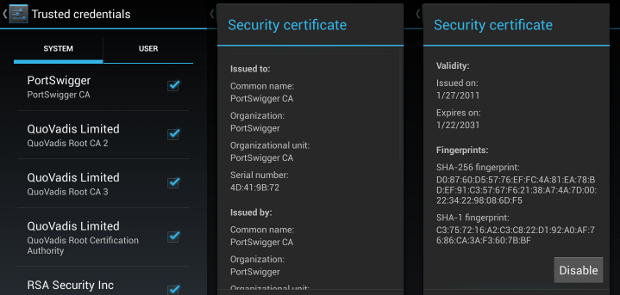
<p>Android 4.x stores root CA certificates in <code>system/etc/security/cacerts/</code> in
PEM format, so running the following command gives a chance to review the
certificate before adding and the output can be used directly by Android.</p>

<pre><code class="no-highlight">&#x24; openssl x509 -in burp.cer -inform DER -text
Certificate:
    Data:
        Version: 3 (0x2)
        Serial Number: 1296145266 (0x4d419b72)
    Signature Algorithm: sha1WithRSAEncryption
        Issuer: C=PortSwigger, ST=PortSwigger, L=PortSwigger, O=PortSwigger, OU=PortSwigger CA, CN=PortSwigger CA
        Validity
            Not Before: Jan 27 16:21:06 2011 GMT
            Not After : Jan 22 16:21:06 2031 GMT
        Subject: C=PortSwigger, ST=PortSwigger, L=PortSwigger, O=PortSwigger, OU=PortSwigger CA, CN=PortSwigger CA
        Subject Public Key Info:
            Public Key Algorithm: rsaEncryption
                Public-Key: (1024 bit)
                Modulus:
                    00:a0:c2:98:2b:18:cf:06:42:4a:7b:a8:c9:ce:ab:
                    1d:ec:af:95:14:2a:dd:58:53:35:9d:68:18:86:a5:
                    3a:84:6e:6c:32:58:11:f3:d7:bf:b4:9e:29:d2:dc:
                    22:d2:7f:23:36:16:9d:10:c4:e5:4c:69:55:4d:95:
                    05:9f:9b:f8:33:37:8d:9f:d0:23:0f:61:d4:53:d7:
                    40:fd:da:6d:f0:04:75:2c:ef:75:77:0a:4a:8c:34:
                    f7:06:6b:4e:ea:58:af:a7:89:51:6b:33:a2:89:5c:
                    6b:64:cb:e6:31:a7:7f:cf:0a:04:59:5b:a4:9e:e3:
                    96:53:6a:01:83:81:2b:0b:11
                Exponent: 65537 (0x10001)
        X509v3 extensions:
            X509v3 Subject Key Identifier: 
                FE:2F:6C:CD:EB:72:53:1E:24:33:48:35:A9:1C:DC:C7:D6:42:6F:35
            X509v3 Basic Constraints: critical
                CA:TRUE, pathl&#x65;n:0
    Signature Algorithm: sha1WithRSAEncryption
         1e:f0:92:13:bd:05:e8:03:33:27:72:3d:03:93:1e:d9:d6:cc:
         f0:bd:ae:e2:a3:8f:83:e0:65:5e:c7:03:9d:25:d4:d2:8f:6e:
         bc:3e:7d:5c:28:2d:b3:dd:c0:8b:8e:60:c5:a8:8c:26:dc:19:
         50:db:da:03:fb:39:e0:72:01:26:47:a7:ea:c4:58:f5:c9:71:
         bf:03:cd:af:16:07:6d:a5:36:72:4c:b5:8d:4f:86:4a:bc:60:
         1c:01:62:eb:e5:48:a0:83:c6:1c:ea:b9:36:d6:b1:f1:de:e6:
         19:4a:2a:76:7e:d3:d2:39:70:64:a3:63:ce:89:da:2e:7d:17:
         ff:52
-----BEGIN CERTIFICATE-----
MIICxDCCAi2gAwIBAgIETUGbcjANBgkqhkiG9w0BAQUFADCBijEUMBIGA1UEBhML
UG9ydFN3aWdnZXIxFDASBgNVBAgTC1BvcnRTd2lnZ2VyMRQwEgYDVQQHEwtQb3J0
U3dpZ2dlcjEUMBIGA1UEChMLUG9ydFN3aWdnZXIxFzAVBgNVBAsTDlBvcnRTd2ln
Z2VyIENBMRcwFQYDVQQDEw5Qb3J0U3dpZ2dlciBDQTAeFw0xMTAxMjcxNjIxMDZa
Fw0zMTAxMjIxNjIxMDZaMIGKMRQwEgYDVQQGEwtQb3J0U3dpZ2dlcjEUMBIGA1UE
CBMLUG9ydFN3aWdnZXIxFDASBgNVBAcTC1BvcnRTd2lnZ2VyMRQwEgYDVQQKEwtQ
b3J0U3dpZ2dlcjEXMBUGA1UECxMOUG9ydFN3aWdnZXIgQ0ExFzAVBgNVBAMTDlBv
cnRTd2lnZ2VyIENBMIGfMA0GCSqGSIb3DQEBAQUAA4GNADCBiQKBgQCgwpgrGM8G
Qkp7qMnOqx3sr5UUKt1YUzWdaBiGpTqEbmwyWBHz17+0ninS3CLSfyM2Fp0QxOVM
aVVNlQWfm/gzN42f0CMPYdRT10D92m3wBHUs73V3CkqMNPcGa07qWK+niVFrM6KJ
XGtky+Yxp3/PCgRZW6Se45ZTagGDgSsLEQIDAQABozUwMzAdBgNVHQ4EFgQU/i9s
zetyUx4kM0g1qRzcx9ZCbzUwEgYDVR0TAQH/BAgwBgEB/wIBADANBgkqhkiG9w0B
AQUFAAOBgQAe8JITvQXoAzMncj0Dkx7Z1szwva7io4+D4GVexwOdJdTSj268Pn1c
KC2z3cCLjmDFqIwm3BlQ29oD+zngcgEmR6fqxFj1yXG/A82vFgdtpTZyTLWNT4ZK
vGAcAWLr5Uigg8Yc6rk21rHx3uYZSip2ftPSOXBko2POidoufRf/Ug==
-----END CERTIFICATE-----
</code></pre>

<p>As <a href="http://stackoverflow.com/a/12134348">rustix wrote</a>, the file name needs to be the the hash of the subject of
the certificate, in case of the above certificate, it can be calculated as the
following.</p>

<pre><code class="no-highlight">&#x24; openssl x509 -noout -subject_hash_old -inform DER -in burp.cer
9a5ba575
</code></pre>

<p>Now all we need is to upload the file using <a href="http://developer.android.com/tools/help/adb.html">adb</a>.</p>

<pre><code class="no-highlight">&#x24; adb push burp.cer /system/etc/security/cacerts/9a5ba575.0
failed to copy 'burp.cer' to '/system/etc/security/cacerts/9a5ba575.0':
    Read-only file system
</code></pre>

<p>The error message was fairly straightforward, <code>/system</code> is mounted read-only,
all we need to do is remounting it in read-write (rw) mode.</p>

<pre><code class="no-highlight">&#x24; adb shell
root@android:/ # mount -o rw,remount /system
root@android:/ # ^D
&#x24; adb push burp.cer /system/etc/security/cacerts/9a5ba575.0
failed to copy 'burp.cer' to '/system/etc/security/cacerts/9a5ba575.0':
    Out of memory
</code></pre>

<p>That's a tougher one, but easily solveable by resizing the system partition
using the emulator command line argument <code>-partition-size</code>. With this change as
well as the library path for OpenGL, the full command line looks like the
following (of course, <code>64</code> should be removed if you're using a 32-bit OS).</p>

<pre><code class="no-highlight">&#x24; LD_LIBRARY_PATH=tools/lib/ tools/emulator64-arm -avd Android17 \
    -http-proxy http://127.0.0.1:8081 -partition-size 512
</code></pre>

<p>Since restarting the emulator wiped my changes from <code>/system</code>, I had to upload
the certificate again, and finally, it appeared in the list of system
certificates.</p>

<p><img src="https://techblog.vsza.hu/images/burp-android-sys-ca.png" alt="Burp Proxy root CA in Android System CA store" title="" /></p>

<p>This being done, all applications using SSL/TLS connections (except for those
that do <a href="https://www.owasp.org/index.php/Certificate_and_Public_Key_Pinning">certificate pinning</a>) will accept the MITM of Burp, as it can
be seen below with Google as an example. The top half is the certificate
viewer of the Android web browser, stating that Portswigger issuing a
certificate for <code>www.google.com</code> is perfectly valid, while the bottom half
is the Burp Proxy window, showing the contents of the HTTPS request.</p>

<p><img src="https://techblog.vsza.hu/images/android-browser-burp-ca.png" alt="Android web browser using the Burp CA" title="" /></p>
]]></content>
	</entry>
	<entry>
		<title>MWR BSides Challenge 2013 writeup</title>
		<link rel="alternate" type="text/html" href="https://techblog.vsza.hu/posts/MWR_BSides_Challenge_2013_writeup.html"/>
		<updated>2013-04-27T12:32:48+02:00</updated>
      <id>https://techblog.vsza.hu/posts/MWR_BSides_Challenge_2013_writeup.html</id>
      <author><name>dnet</name></author>
		<category term="POSTCATEGORY" scheme="http://www.sixapart.com/ns/types#category"/>
		<content type="html" xml:lang="en" xml:base="https://techblog.vsza.hu"><![CDATA[
      <p>On 11<sup>th</sup> March 2013, MWR Labs <a href="http://labs.mwrinfosecurity.com/blog/2013/03/11/bsides-chall&#x65;nge/">announced a chall&#x65;nge</a> that involved
an Android application called Evil Planner. I got the news on 12<sup>th</sup>
March around 17:00 and by 20:30 I found two vulnerabilities in the application
and had a working malware that could extract the data protected by the app.
The app I created as a proof-of-concept is available in its
<a href="https://github.com/dnet/evil-planner-solution">GitHub repository</a>, and below are the steps I've taken to assess the
security of the application.</p>

<p>The application itself was quite simple, and seemed secure at first sight. It
required the user to use a PIN code to protect information entered. Unlike
many application it even used this PIN code to encrypt the database, so even
if the device was stol&#x65;n, the user shouldn't have worried about it.</p>

<p>After downloading the APK, I unzipped it and converted the <code>classes.dex</code> file
containing the Dalvik bytecode to a JAR file using <a href="http://code.google.com/p/dex2jar/">dex2jar</a>. I opened the
resulting JAR with <a href="http://java.decompiler.free.fr/?q=jdgui">JD-GUI</a> and saw that no obfuscation took place, so all
class, method and member names were available. For example, the <code>Login</code> class
contained the following line, revealing where the PIN code was stored:</p>

<pre><code>private final String PIN_FILE = "/creds.txt";
</code></pre>

<p>Further static code analysis revealed that the PIN code was stored in the file
using a simple method of encoding (I wouldn't dare calling it encryption).</p>

<pre><code class="java">public static String encryptPIN(String paramString,
    TelephonyManager paramTelephonyManager)
{
    String str1 = paramTelephonyManager.getDeviceId();
    String str2 = paramString.substring(0, 4);
    byte[] arrayOfByte1 = str1.getBytes();
    byte[] arrayOfByte2 = str2.getBytes();
    return Base64.encodeToString(xor(arrayOfByte1, arrayOfByte2), 2);
}
</code></pre>

<p>Although variable names are not available to JD-GUI, it's still easy to see
what happens: the <code>getDeviceId</code> method <a href="http://developer.android.com/reference/android/telephony/TelephonyManager.html#getDeviceId()">returns the IMEI of the device</a>,
and this gets XOR'd with the PIN string. The result can have weird characters,
so it's Base64 encoded before being written to <code>creds.txt</code>.</p>

<p>As you can see, this method of encoding is easily reversible, but I wouldn't
even need to go that far, since there's a <code>decryptPIN</code> method as well that
performs the reverse of the code above. Thus acquiring the PIN code protecting
the application is only a matter of accessing the <code>creds.txt</code>, which has its
permissions set correctly, so it's only accessible to the Evil Planner.</p>

<p>However, using <a href="http://code.google.com/p/android-apktool/">apktool</a> to get readable XMLs from the binary ones used in
APK files revealed that the application exposes two <a href="http://developer.android.com/guide/topics/providers/content-providers.html">content providers</a>
whose security implications <a href="https://techblog.vsza.hu/posts/Seesmic_Android_information_leak.html">I already mentioned with regard to Seesmic</a>.</p>

<pre><code>&lt;provider android:name=".content.LogFileContentProvider" 
    android:authorities="com.mwri.fileEncryptor.localfile" /&gt;
&lt;provider android:name="com.example.bsidechall&#x65;nge.content.DBContentProvider"
    android:authorities="com.example.bsideschall&#x65;nge.evilPlannerdb" /&gt;
</code></pre>

<p>Latter is more like the one used by Seesmic and would've provided some limited
access to the database, so I turned my attention to the other. Former is more
interesting since it implements the <code>openFile</code> method in a way that it just
opens a file received in a parameter without any checks, as it can be seen in
the decompiled fragment below. (I removed some unrelated lines regarding
logging to make it easier to read, but didn't change it in any other way.)</p>

<pre><code>public ParcelFileDescriptor openFile(Uri paramUri, String paramString)
    throws FileNotFoundException
{
    // removed logging from here
    String str5 = paramUri.getPath();
    return ParcelFileDescriptor.open(new File(str5), 268435456);
}
</code></pre>

<p>Since the content provider is not protected in any way, this makes it possible
to access any file with the privileges of the Evil Planner. In the
proof-of-concept code, I used the following function to wrap its functionality
into a simple method that gets a path as a parameter, and returns an
<code>InputStream</code> that can be used to access the contents of that file.</p>

<pre><code>protected InputStream openFile(String path) throws Exception {
    return getContentResolver().openInputStream(Uri.parse(
                "content://com.mwri.fileEncryptor.localfile" + path));
}
</code></pre>

<p>Having this, reading the contents of <code>creds.txt</code> only took a few lines (and
even most of those just had to do with the crappy IO handling of Java).</p>

<pre><code class="java">InputStream istr = openFile(
            "/data/data/com.example.bsidechall&#x65;nge/files/creds.txt");
InputStreamReader isr = new InputStreamReader(istr);
BufferedReader br = new BufferedReader(isr);
String creds = br.readLine();
</code></pre>

<p>Since I had access to every file that Evil Planner had, the rest was just
copy-pasting code from JD-GUI to decrypt the PIN, get the database file in
the same way, decrypt that using the PIN, and dump it on the screen. All of
the logic can be found in <a href="https://github.com/dnet/evil-planner-solution/blob/master/src/hu/vsza/bsides/malware/Main.java">Main.java</a>, and the result looks like the
following screenshot.</p>

<p><img src="https://vsza.hu/mwr-chall&#x65;nge-pin-db.png" alt="Working proof-of-concept displaying sensitive information" title="" /></p>

<p>I'd like to thank the guys at MWR for creating this chall&#x65;nge, I don't
remember any smartphone app security competitions before. Although I felt
that the communication was far from being perfect (it's not a great feeling
having the solution ready, but having no address to send it to), it was fun,
and they even told me they'll send a T-shirt for taking part in the game.
Congratulation to the winners, and let's hope this wasn't the last
chall&#x65;nge of its kind!</p>
]]></content>
	</entry>
</feed>